How to Configure Permissions for Vehicle Data Collection
Step-by-step guide to selecting signals, commands, and attributes in the Smartcar Dashboard and requesting the right permissions from vehicle owners.
To retrieve vehicle data through Smartcar, you must configure your application to request the correct permissions from vehicle owners. This guide walks you through the process using the Smartcar Dashboard.
1
Open the Configuration Page in the Dashboard
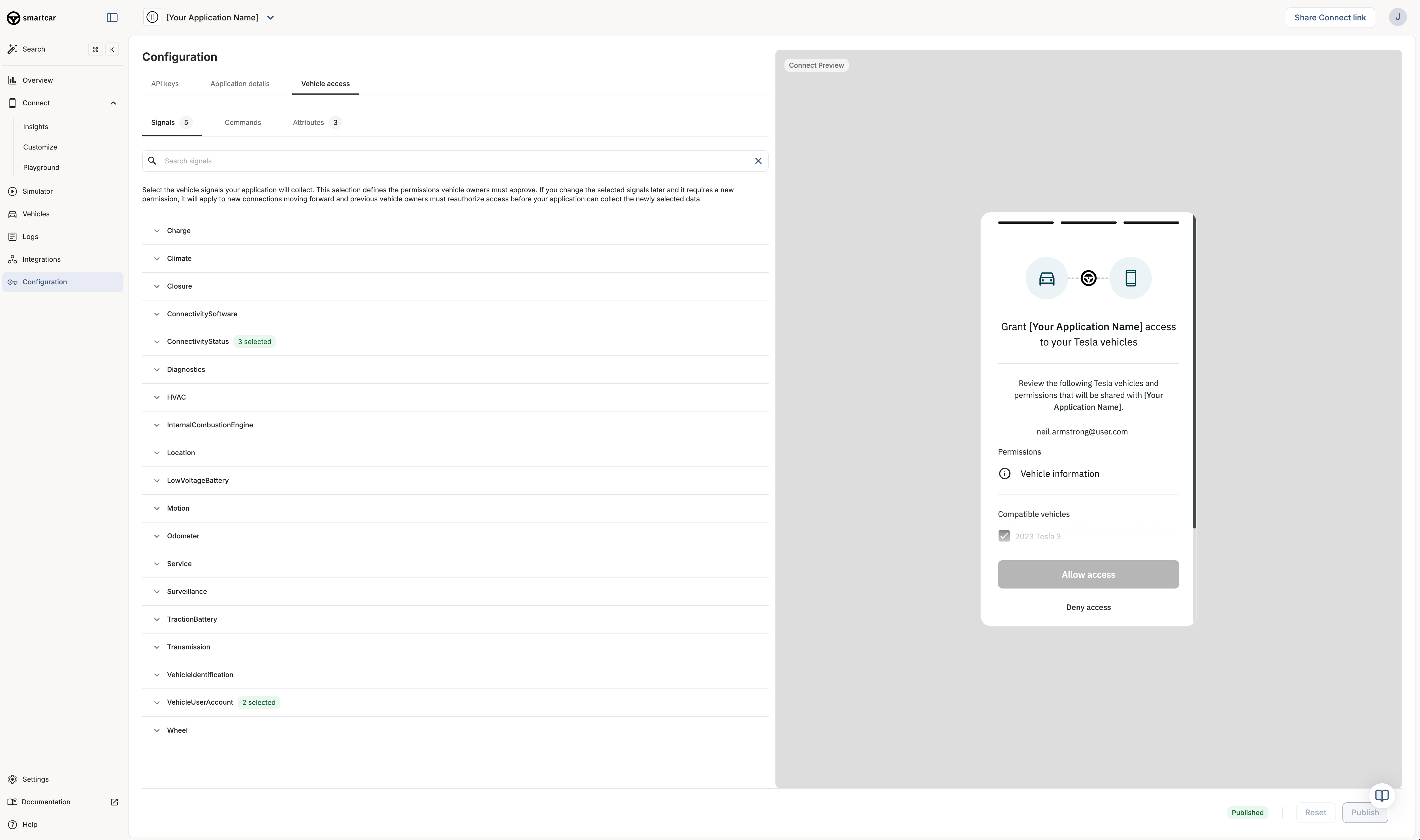
Go to the Smartcar Dashboard and select your application. Navigate to the Configuration section and choose the Vehicle access tab.
2
Select Signals, Commands, and Attributes
Under the Signals, Commands, and Attributes tabs, select the specific vehicle data points and actions your application needs. Each selection corresponds to a permission that the vehicle owner must approve.
Application Configuration in Smartcar Dashboard
Signals: Dynamic vehicle data (e.g., battery level, odometer, location).
Commands: Actions your app can perform (e.g., lock/unlock, start charging).
Attributes: Static vehicle info (e.g., make, model, year).
Only select the permissions your application truly needs. This improves user trust and increases the likelihood of successful connections.
3
Preview the Owner Experience
As you select signals, commands, and attributes, the Connect Preview on the right updates to show what the vehicle owner will see when connecting their vehicle. This preview lists the permissions your app is requesting and the vehicles that will be connected.
4
Publish Your Configuration
Once you are satisfied with your selections, click Publish to save your configuration. Your application will now request these permissions from vehicle owners during the Smartcar Connect flow.
If your application needs to access different permissions based on user actions or vehicle types, you can leverage the scope parameter in the Smartcar Connect URL to dynamically request permissions at runtime. This allows you to tailor the permissions based on the specific vehicle or user context.
Keep in mind that any permissions you pass via the scope parameter will override the permissions configured in the Smartcar Dashboard for that specific connection.
If you need to change permissions later, you can return to this configuration page and update your selections. Vehicle owners will need to reauthorize your application to grant any new permissions.
The permissions you select here will determine the data and actions available to your application. Make sure to choose only what is necessary for your use case.
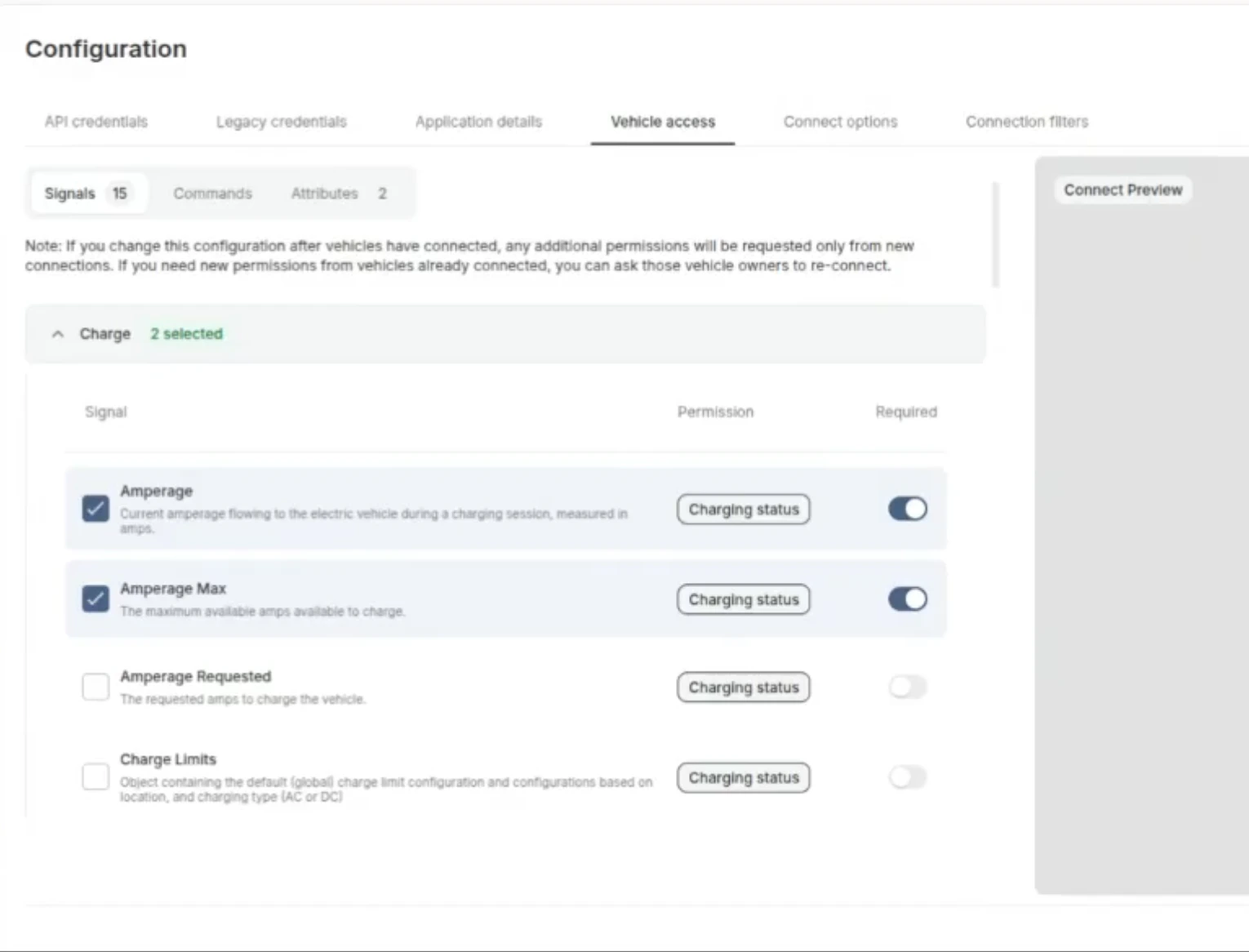
In the Vehicle Access tab, each signal has a Required toggle that controls how its permission appears to vehicle owners on the Connect grant screen.
Required (toggle on): the permission appears checked and locked. The vehicle owner cannot uncheck it.
Optional (toggle off): the permission appears checked by default, and the vehicle owner can uncheck it before connecting.
The Required toggle in the Dashboard's Vehicle Access tab.
At least one permission must remain selected for the owner to complete the connection.Only mark a permission as required if it is absolutely necessary for your application to function. Leaving non-essential permissions optional gives vehicle owners more control and can improve your connection rate.
Marking a permission as required signals that your application needs it. It does not guarantee the vehicle supports it. To restrict which vehicles can connect by powertrain type, use Connection Filters.
{"docsConfig":{"theme":"mint","$schema":"https://mintlify.com/docs.json","name":"smartcar","colors":{"primary":"#3E577D","light":"#3E577D","dark":"#3E577D"},"logo":{"light":"https://mintcdn.com/smartcar-docs/YqcNJdgEDgXpXtEG/logo/light.png?fit=max\u0026auto=format\u0026n=YqcNJdgEDgXpXtEG\u0026q=85\u0026s=c8947958467fe403a12f769afada9b53","dark":"https://mintcdn.com/smartcar-docs/YqcNJdgEDgXpXtEG/logo/dark.png?fit=max\u0026auto=format\u0026n=YqcNJdgEDgXpXtEG\u0026q=85\u0026s=af6b6bcabc2fe0bc4bbd976ee5b71a36","href":"https://smartcar.com/"},"favicon":"https://mintcdn.com/smartcar-docs/NtuX9OSBHLxFwWIa/favicon.png?fit=max\u0026auto=format\u0026n=NtuX9OSBHLxFwWIa\u0026q=85\u0026s=de01fc4e56d5368d441e322ac50e3f81","api":{"playground":{"display":"interactive","proxy":false},"examples":{"prefill":true}},"navbar":{"links":[{"href":"https://dashboard.smartcar.com/login/","label":"Log in"},{"href":"https://dashboard.smartcar.com/signup/","label":"Sign up"}],"primary":{"type":"button","label":"Request a Demo","href":"https://smartcar.com/pricing/"}},"footer":{"socials":{"linkedin":"https://www.linkedin.com/company/smartcar","github":"https://github.com/smartcar","facebook":"https://www.facebook.com/smartcar","instagram":"https://www.instagram.com/mysmartcar","x":"https://x.com/mysmartcar"},"links":[{"header":"Product","items":[{"label":"Vehicle signals","href":"https://smartcar.com/product/signals"},{"label":"Vehicle commands","href":"https://smartcar.com/product/commands"},{"label":"Compatible brands","href":"https://smartcar.com/product/compatible-vehicles"},{"label":"Connect","href":"https://smartcar.com/product/connect"},{"label":"Integrations","href":"https://smartcar.com/product/integrations"},{"label":"Global coverage","href":"https://smartcar.com/global"},{"label":"Teams","href":"https://smartcar.com/product/teams"},{"label":"Vehicle management","href":"https://smartcar.com/product/vehicle-management"},{"label":"Analytics","href":"https://smartcar.com/product/analytics"},{"label":"Pricing","href":"https://smartcar.com/pricing"},{"label":"Status","href":"https://status.smartcar.com/"},{"label":"Brand reliability","href":"https://brandreliability.smartcar.com/"},{"label":"Data security","href":"https://smartcar.com/data-security"}]},{"header":"Energy Solutions","items":[{"label":"DERMs","href":"https://smartcar.com/industries/derms-software"},{"label":"Virtual Power Plants (VPPs)","href":"https://smartcar.com/industries/virtual-power-plant"},{"label":"Utilities","href":"https://smartcar.com/utilities"},{"label":"Home energy management","href":"https://smartcar.com/industries/home-energy-management"},{"label":"EV charging networks","href":"https://smartcar.com/industries/ev-charging"},{"label":"Charge point operators","href":"https://smartcar.com/industries/charge-point-operator"},{"label":"E-mobility service providers","href":"https://smartcar.com/industries/e-mobility-service-providers"}]},{"header":"Solutions","items":[{"label":"Repair and maintenance","href":"https://smartcar.com/industries/repair-maintenance"},{"label":"Autocare software","href":"https://smartcar.com/industries/autocare-software"},{"label":"Auto dealership","href":"https://smartcar.com/industries/auto-dealership-software"},{"label":"Roadside assistance","href":"https://smartcar.com/industries/roadside-assistance"},{"label":"Vehicle history reports","href":"https://smartcar.com/industries/vehicle-history-reports"},{"label":"Small fleet management","href":"https://smartcar.com/industries/fleet-management"},{"label":"Car subscription service","href":"https://smartcar.com/industries/car-subscription-services"},{"label":"Car sharing","href":"https://smartcar.com/industries/car-sharing"},{"label":"Ride hailing","href":"https://smartcar.com/industries/ride-sharing"},{"label":"Car rentals","href":"https://smartcar.com/industries/car-rental"},{"label":"Auto insurance","href":"https://smartcar.com/industries/auto-insurance"},{"label":"Warranty software","href":"https://smartcar.com/industries/warranty-management-software"},{"label":"Road usage charge","href":"https://smartcar.com/industries/road-usage-charge"}]},{"header":"Resources","items":[{"label":"Customers","href":"https://smartcar.com/customers"},{"label":"Blog","href":"https://smartcar.com/blog"},{"label":"For vehicle owners","href":"https://smartcar.com/vehicle-owners"},{"label":"For automakers","href":"https://smartcar.com/automakers"},{"label":"Terms of service","href":"https://smartcar.com/legal/terms"},{"label":"Privacy policy","href":"https://smartcar.com/legal/privacy"},{"label":"End user privacy policy","href":"https://smartcar.com/legal/end-user-privacy"},{"label":"Acceptable use","href":"https://smartcar.com/legal/acceptable-use"},{"label":"Data processing","href":"https://smartcar.com/legal/dpa"},{"label":"Vulnerability disclosure program","href":"https://smartcar.com/vdp"},{"label":"mySmartcar","href":"https://my.smartcar.com"}]}]},"search":{"prompt":"✨ Ask Smartcar"},"integrations":{"koala":{"publicApiKey":"pk_3a64cc4d12d7b978edffae0afd143df5b291"},"ga4":{"measurementId":"G-QHNXS91VZC"}},"styling":{"latex":true},"navigation":{"pages":[]}},"deployment":{"deploymentMetadataValue":{"subdomain":"smartcar-docs","hasAudioNarration":false,"actualSubdomain":"smartcar-docs","customDomains":["smartcar.com"],"gitSource":{"type":"github","owner":"smartcar","repo":"docs","deployBranch":"main","contentDirectory":"","isPrivate":false,"mountPath":"","label":""},"chroma":{"liveDeploymentHistoryId":"6adbe250d05dd52d1c87e7c2","collectionId":"4e81bf89-a564-4084-82d5-a2f1a4b41ad6","schemaVersion":"v3","latestBuiltDeploymentHistoryId":"6adbe250d05dd52d1c87e7c2"},"feedback":{"thumbs":true},"entitlements":{"AI_CHAT":{"status":"ENABLED"},"REMOVE_BRANDING":{"status":"ENABLED"},"CONTEXTUAL_FEEDBACK":{"status":"ENABLED"},"CODE_SNIPPET_FEEDBACK":{"status":"ENABLED"},"WEB_MCP":{"status":"ENABLED"},"NARRATION":{"status":"ENABLED"}},"buildId":"6adbe250d05dd52d1c87e7c2","clientVersion":"0.0.4044","searchFilterCounts":[{"language":"default","tag":"API \u0026 Integrations Reference","count":147},{"language":"default","tag":"API 2.0 Reference (Legacy)","count":64},{"language":"default","tag":"Vehicle Data","count":48},{"language":"default","tag":"Help Center","count":36},{"language":"default","tag":"Getting Started","count":28},{"language":"default","tag":"Make Specific","count":27},{"language":"default","tag":"Introduction","count":26},{"language":"default","tag":"Tesla","count":26},{"language":"default","tag":"Webhooks","count":25},{"language":"default","tag":"Errors","count":20}]},"assistantConfig":{},"basePath":"/docs","hasChatPermissions":true,"hasWebMcpPermissions":true,"toggles":[{"name":"kill-isr","enabled":true,"variant":{"name":"disabled","enabled":false,"feature_enabled":true},"impressionData":false},{"name":"agent-mintlify-slack","enabled":true,"variant":{"name":"disabled","enabled":false,"feature_enabled":true},"impressionData":false},{"name":"agent-integrations-settings","enabled":true,"variant":{"name":"disabled","enabled":false,"feature_enabled":true},"impressionData":false},{"name":"automations-pr-grouping","enabled":true,"variant":{"name":"disabled","enabled":false,"feature_enabled":true},"impressionData":false},{"name":"custom-prefix","enabled":true,"variant":{"name":"disabled","enabled":false,"feature_enabled":true},"impressionData":false},{"name":"analytics-v7","enabled":true,"variant":{"name":"disabled","enabled":false,"feature_enabled":true},"impressionData":false},{"name":"user-flows-analytics","enabled":true,"variant":{"name":"disabled","enabled":false,"feature_enabled":true},"impressionData":false},{"name":"no-publish-flow","enabled":true,"variant":{"name":"disabled","enabled":false,"feature_enabled":true},"impressionData":false},{"name":"workos-onboarding","enabled":true,"variant":{"name":"disabled","enabled":false,"feature_enabled":true},"impressionData":false},{"name":"llms-txt-v2","enabled":true,"variant":{"name":"disabled","enabled":false,"feature_enabled":true},"impressionData":false},{"name":"snapshot-serving-live","enabled":true,"variant":{"name":"disabled","enabled":false,"feature_enabled":true},"impressionData":false},{"name":"stripTemperatureMiddleware","enabled":true,"variant":{"name":"disabled","enabled":false,"feature_enabled":true},"impressionData":false},{"name":"support-platform-pylon-zendesk","enabled":true,"variant":{"name":"disabled","enabled":false,"feature_enabled":true},"impressionData":false},{"name":"snapshot-serving","enabled":true,"variant":{"name":"disabled","enabled":false,"feature_enabled":true},"impressionData":false},{"name":"instant-rollback","enabled":true,"variant":{"name":"disabled","enabled":false,"feature_enabled":true},"impressionData":false},{"name":"granular-notifications-server","enabled":true,"variant":{"name":"disabled","enabled":false,"feature_enabled":true},"impressionData":false},{"name":"granular-notifications","enabled":true,"variant":{"name":"disabled","enabled":false,"feature_enabled":true},"impressionData":false},{"name":"automations-fable","enabled":true,"variant":{"name":"disabled","enabled":false,"feature_enabled":true},"impressionData":false},{"name":"fixed-ai-action-pricing","enabled":true,"variant":{"name":"disabled","enabled":false,"feature_enabled":true},"impressionData":false},{"name":"automation-resolve-merge-conflict","enabled":true,"variant":{"name":"disabled","enabled":false,"feature_enabled":true},"impressionData":false},{"name":"scoped-publishing","enabled":true,"variant":{"name":"disabled","enabled":false,"feature_enabled":true},"impressionData":false},{"name":"mintql","enabled":true,"variant":{"name":"disabled","enabled":false,"feature_enabled":true},"impressionData":false},{"name":"page-level-analytics","enabled":true,"variant":{"name":"disabled","enabled":false,"feature_enabled":true},"impressionData":false},{"name":"editor-version-history-v2","enabled":true,"variant":{"name":"disabled","enabled":false,"feature_enabled":true},"impressionData":false},{"name":"billing-page-v2","enabled":true,"variant":{"name":"disabled","enabled":false,"feature_enabled":true},"impressionData":false},{"name":"full-page-search","enabled":true,"variant":{"name":"disabled","enabled":false,"feature_enabled":true},"impressionData":false},{"name":"workspace-projects","enabled":true,"variant":{"name":"disabled","enabled":false,"feature_enabled":true},"impressionData":false},{"name":"assistant-v5","enabled":true,"variant":{"name":"disabled","enabled":false,"feature_enabled":true},"impressionData":false},{"name":"byok-sep-25","enabled":true,"variant":{"name":"disabled","enabled":false,"feature_enabled":true},"impressionData":false},{"name":"fork-pr-previews","enabled":true,"variant":{"name":"disabled","enabled":false,"feature_enabled":true},"impressionData":false},{"name":"revalidation-jwt","enabled":true,"variant":{"name":"disabled","enabled":false,"feature_enabled":true},"impressionData":false},{"name":"vite-origin","enabled":true,"variant":{"name":"disabled","enabled":false,"feature_enabled":true},"impressionData":false},{"name":"billing-updated-9-15","enabled":true,"variant":{"name":"disabled","enabled":false,"feature_enabled":true},"impressionData":false},{"name":"workos-sso-scim","enabled":true,"variant":{"name":"disabled","enabled":false,"feature_enabled":true},"impressionData":false},{"name":"hobby-abuse-scan","enabled":true,"variant":{"name":"disabled","enabled":false,"feature_enabled":true},"impressionData":false},{"name":"dashboard-inbox","enabled":true,"variant":{"name":"disabled","enabled":false,"feature_enabled":true},"impressionData":false},{"name":"workos-signup","enabled":true,"variant":{"name":"disabled","enabled":false,"feature_enabled":true},"impressionData":false},{"name":"turbopuffer-dual-write","enabled":true,"variant":{"name":"disabled","enabled":false,"feature_enabled":true},"impressionData":false},{"name":"workos-enabled","enabled":true,"variant":{"name":"disabled","enabled":false,"feature_enabled":true},"impressionData":false},{"name":"approve-review-flow","enabled":true,"variant":{"name":"disabled","enabled":false,"feature_enabled":true},"impressionData":false},{"name":"sso-setup-deadline-banner","enabled":true,"variant":{"name":"disabled","enabled":false,"feature_enabled":true},"impressionData":false}],"googleFontsInlined":false},"customCss":[{"filePath":"style.css","content":".hsfc-Form .hsfc-FieldLabel span:is(.dark *),.hsfc-Form .hsfc-RichText p:is(.dark *),.hsfc-PostSubmit .hsfc-RichText p:is(.dark *){color:#a0a1a2}.dark\\:text-primary-light:is(.dark *){color:#378ff0}.hsfc-FormWrapper .hsfc-Step .hsfc-Step__Content{padding:0 10px 20px;background-color:rgb(113 113 122/10%);border-radius:10px}.hsfc-FormWrapper .hsfc-Step .hsfc-Step__Content .hsfc-Row{margin-bottom:4px}.hsfc-FormWrapper .hsfc-Step .hsfc-Step__Content .hsfc-NavigationRow{margin-top:4px}.osano-cm-powered-by__link.osano-cm-link,.osano-cm-window__widget{display:none}.osano-cm-close svg{stroke:#fff!important}.osano-cm-dialog{font-family:Inter,ui-sans-serif,system-ui,sans-serif;border-radius:12px;box-shadow:0 -4px 24px rgba(0,0,0,.08);padding:20px 24px;background-color:#fff;color:#374151;border-top:1px solid #e5e7eb}.osano-cm-dialog__title{font-size:.9rem;font-weight:600;color:#111827;margin-bottom:6px}.osano-cm-dialog__description,.osano-cm-message{font-size:.825rem;color:#6b7280;line-height:1.5}.osano-cm-storage-policy{font-size:.825rem;line-height:1.5}.osano-cm-message:is(.dark *){color:#fff}.osano-cm-info a,.osano-cm-storage-policy{color:#3e577d}.osano-cm-button{font-family:Inter,ui-sans-serif,system-ui,sans-serif;font-size:.825rem;font-weight:500;border-radius:6px;padding:7px 14px;transition:opacity .15s ease}.osano-cm-button:hover{opacity:.85}.osano-cm-accept,.osano-cm-button--save,.osano-cm-save{background-color:#3e577d!important;color:#fff!important;border:0!important}.osano-cm-deny,.osano-cm-manage{background-color:transparent!important;color:#3e577d!important;border:1px solid #3e577d!important}.osano-cm-manage{border:0!important;padding-left:4px!important;padding-right:4px!important;text-decoration:underline;text-underline-offset:2px}.osano-cm-dialog:is(.dark *){background-color:#1f2937;color:#d1d5db;border-top-color:#374151;box-shadow:0 -4px 24px rgba(0,0,0,.3)}.osano-cm-dialog__title:is(.dark *){color:#f9fafb}.osano-cm-dialog__description:is(.dark *){color:#9ca3af}.osano-cm-info a:is(.dark *),.osano-cm-storage-policy:is(.dark *){color:#93b4d8}.osano-cm-deny:is(.dark *){color:#93b4d8!important;border-color:#93b4d8!important}.osano-cm-manage:is(.dark *){color:#93b4d8!important}.osano-cm-info{font-family:Inter,ui-sans-serif,system-ui,sans-serif;border-radius:0;box-shadow:0 -4px 24px rgba(0,0,0,.08);background-color:#fff;color:#374151;border-top:1px solid #e5e7eb;min-width:480px;overflow-y:visible}.osano-cm-header,.osano-cm-info-dialog-header{background-color:#fff!important}.osano-cm-info__title{font-size:.9rem;font-weight:600;color:#111827}.osano-cm-info__description,.osano-cm-info__list{font-size:.825rem;color:#6b7280;line-height:1.5}.osano-cm-toggle__switch{background-color:#e5e7eb!important;border-color:#3e577d!important}.osano-cm-toggle__input:checked+.osano-cm-toggle__switch{background-color:#3e577d!important;border-color:#3e577d!important}.osano-cm-toggle__input:checked+.osano-cm-toggle__switch::after{background-color:#e5e7eb!important}.osano-cm-info:is(.dark *){background-color:#1f2937;color:#d1d5db;border-top-color:#374151;box-shadow:0 -4px 24px rgba(0,0,0,.3)}.osano-cm-header:is(.dark *),.osano-cm-info-dialog-header:is(.dark *){background-color:#1f2937!important}.osano-cm-info__title:is(.dark *){color:#f9fafb}.osano-cm-info__description:is(.dark *),.osano-cm-info__list:is(.dark *){color:#9ca3af}.osano-cm-toggle__switch:is(.dark *){background-color:#374151!important}"}],"page":{"pagePath":"getting-started/how-to/configure-permissions","slug":"/getting-started/how-to/configure-permissions","pageMetadata":{"title":"How to Configure Permissions for Vehicle Data Collection","sidebarTitle":"Configure Permissions","description":"Step-by-step guide to selecting signals, commands, and attributes in the Smartcar Dashboard and requesting the right permissions from vehicle owners.","href":"/getting-started/how-to/configure-permissions"},"description":{"compiledSource":"\"use strict\";\nconst {jsx: _jsx} = arguments[0];\nconst {useMDXComponents: _provideComponents} = arguments[0];\nfunction _createMdxContent(props) {\n const _components = {\n p: \"p\",\n ..._provideComponents(),\n ...props.components\n };\n return _jsx(_components.p, {\n children: \"Step-by-step guide to selecting signals, commands, and attributes in the Smartcar Dashboard and requesting the right permissions from vehicle owners.\"\n });\n}\nfunction MDXContent(props = {}) {\n const {wrapper: MDXLayout} = {\n ..._provideComponents(),\n ...props.components\n };\n return MDXLayout ? _jsx(MDXLayout, {\n ...props,\n children: _jsx(_createMdxContent, {\n ...props\n })\n }) : _createMdxContent(props);\n}\nreturn {\n default: MDXContent\n};\n","frontmatter":{},"scope":{}},"pageType":"default","mdx":{"mdxSource":{"compiledSource":"\"use strict\";const{Fragment:_Fragment,jsx:_jsx,jsxs:_jsxs}=arguments[0];const{useMDXComponents:_provideComponents}=arguments[0];function _createMdxContent(props){const _components={a:`a`,code:`code`,hr:`hr`,li:`li`,p:`p`,strong:`strong`,ul:`ul`,..._provideComponents(),...props.components},{Frame,Heading,Note,OptimizedImage,Step,Steps}=_components;if(!Frame)_missingMdxReference(`Frame`,true);if(!Heading)_missingMdxReference(`Heading`,true);if(!Note)_missingMdxReference(`Note`,true);if(!OptimizedImage)_missingMdxReference(`OptimizedImage`,true);if(!Step)_missingMdxReference(`Step`,true);if(!Steps)_missingMdxReference(`Steps`,true);return _jsxs(_Fragment,{children:[_jsx(_components.p,{children:`To retrieve vehicle data through Smartcar, you must configure your application to request the correct permissions from vehicle owners. This guide walks you through the process using the Smartcar Dashboard.`}),`\n`,_jsxs(Steps,{children:[_jsx(Step,{title:`Open the Configuration Page in the Dashboard`,children:_jsxs(_components.p,{children:[`Go to the `,_jsx(_components.a,{href:`https://dashboard.smartcar.com/configuration`,children:`Smartcar Dashboard`}),` and select your application. Navigate to the `,_jsx(`b`,{children:`Configuration`}),` section and choose the `,_jsx(`b`,{children:`Vehicle access`}),` tab.`]})}),_jsxs(Step,{title:`Select Signals, Commands, and Attributes`,children:[_jsxs(_components.p,{children:[`Under the `,_jsx(`b`,{children:`Signals`}),`, `,_jsx(`b`,{children:`Commands`}),`, and `,_jsx(`b`,{children:`Attributes`}),` tabs, select the specific vehicle data points and actions your application needs. Each selection corresponds to a permission that the vehicle owner must approve.`]}),_jsx(Frame,{type:`simple`,caption:`Application Configuration in Smartcar Dashboard`,children:_jsx(OptimizedImage,{src:`https://mintcdn.com/smartcar-docs/YqcNJdgEDgXpXtEG/images/how-to/vehicle-access.png?fit=max\u0026auto=format\u0026n=YqcNJdgEDgXpXtEG\u0026q=85\u0026s=8dbd5a5cbf7561ce6890e8b74d2e3af1`,alt:`Smartcar Dashboard configuration page showing signal selection and Connect Preview.`,\"data-og-width\":`5014`,width:`5014`,\"data-og-height\":`2966`,height:`2966`,\"data-path\":`images/how-to/vehicle-access.png`,\"data-optimize\":`true`,\"data-opv\":`3`,srcset:`https://mintcdn.com/smartcar-docs/YqcNJdgEDgXpXtEG/images/how-to/vehicle-access.png?w=280\u0026fit=max\u0026auto=format\u0026n=YqcNJdgEDgXpXtEG\u0026q=85\u0026s=cddfd1c093f18c5addf4747182e51a93 280w, https://mintcdn.com/smartcar-docs/YqcNJdgEDgXpXtEG/images/how-to/vehicle-access.png?w=560\u0026fit=max\u0026auto=format\u0026n=YqcNJdgEDgXpXtEG\u0026q=85\u0026s=ea20d97a8cd21ed0f9b792cdcafb7655 560w, https://mintcdn.com/smartcar-docs/YqcNJdgEDgXpXtEG/images/how-to/vehicle-access.png?w=840\u0026fit=max\u0026auto=format\u0026n=YqcNJdgEDgXpXtEG\u0026q=85\u0026s=8e81876d3862241affee92b987706cea 840w, https://mintcdn.com/smartcar-docs/YqcNJdgEDgXpXtEG/images/how-to/vehicle-access.png?w=1100\u0026fit=max\u0026auto=format\u0026n=YqcNJdgEDgXpXtEG\u0026q=85\u0026s=31c470447fe2ebdf68c75dd3d160a1fd 1100w, https://mintcdn.com/smartcar-docs/YqcNJdgEDgXpXtEG/images/how-to/vehicle-access.png?w=1650\u0026fit=max\u0026auto=format\u0026n=YqcNJdgEDgXpXtEG\u0026q=85\u0026s=ca57dad41510fe85b7c5407384adfac0 1650w, https://mintcdn.com/smartcar-docs/YqcNJdgEDgXpXtEG/images/how-to/vehicle-access.png?w=2500\u0026fit=max\u0026auto=format\u0026n=YqcNJdgEDgXpXtEG\u0026q=85\u0026s=a95f7e18664d6b9d3592652f3c662607 2500w`})}),_jsxs(`ul`,{children:[_jsxs(`li`,{children:[_jsx(`b`,{children:`Signals:`}),` Dynamic vehicle data (e.g., battery level, odometer, location).`]}),_jsxs(`li`,{children:[_jsx(`b`,{children:`Commands:`}),` Actions your app can perform (e.g., lock/unlock, start charging).`]}),_jsxs(`li`,{children:[_jsx(`b`,{children:`Attributes:`}),` Static vehicle info (e.g., make, model, year).`]})]}),_jsx(Note,{children:_jsx(_components.p,{children:`Only select the permissions your application truly needs. This improves user trust and increases the likelihood of successful connections.`})})]}),_jsx(Step,{title:`Preview the Owner Experience`,children:_jsxs(_components.p,{children:[`As you select signals, commands, and attributes, the `,_jsx(`b`,{children:`Connect Preview`}),` on the right updates to show what the vehicle owner will see when connecting their vehicle. This preview lists the permissions your app is requesting and the vehicles that will be connected.`]})}),_jsx(Step,{title:`Publish Your Configuration`,children:_jsxs(_components.p,{children:[`Once you are satisfied with your selections, click `,_jsx(`b`,{children:`Publish`}),` to save your configuration. Your application will now request these permissions from vehicle owners during the Smartcar Connect flow.`]})})]}),`\n`,_jsx(Heading,{level:`2`,id:`dynamic-permissions`,children:`Dynamic Permissions`}),`\n`,_jsxs(_components.p,{children:[`If your application needs to access different permissions based on user actions or vehicle types, you can leverage the `,_jsx(_components.code,{children:`scope`}),` parameter in the Smartcar Connect URL to dynamically request permissions at runtime. This allows you to tailor the permissions based on the specific vehicle or user context.\nKeep in mind that any permissions you pass via the `,_jsx(_components.code,{children:`scope`}),` parameter will override the permissions configured in the Smartcar Dashboard for that specific connection.`]}),`\n`,_jsx(Heading,{level:`3`,id:`notes`,children:`Notes`}),`\n`,_jsxs(_components.ul,{children:[`\n`,_jsx(_components.li,{children:`If you need to change permissions later, you can return to this configuration page and update your selections. Vehicle owners will need to reauthorize your application to grant any new permissions.`}),`\n`,_jsx(_components.li,{children:`The permissions you select here will determine the data and actions available to your application. Make sure to choose only what is necessary for your use case.`}),`\n`]}),`\n`,_jsx(Heading,{level:`2`,id:`mark-permissions-as-required-or-optional`,children:`Mark Permissions as Required or Optional`}),`\n`,_jsxs(_components.p,{children:[`In the `,_jsx(_components.strong,{children:`Vehicle Access`}),` tab, each signal has a `,_jsx(_components.strong,{children:`Required`}),` toggle that controls how its permission appears to vehicle owners on the Connect grant screen.`]}),`\n`,_jsxs(_components.ul,{children:[`\n`,_jsxs(_components.li,{children:[_jsx(_components.strong,{children:`Required`}),` (toggle on): the permission appears checked and locked. The vehicle owner cannot uncheck it.`]}),`\n`,_jsxs(_components.li,{children:[_jsx(_components.strong,{children:`Optional`}),` (toggle off): the permission appears checked by default, and the vehicle owner can uncheck it before connecting.`]}),`\n`]}),`\n`,_jsx(Frame,{type:`simple`,caption:`The Required toggle in the Dashboard's Vehicle Access tab.`,children:_jsx(OptimizedImage,{src:`https://mintcdn.com/smartcar-docs/AnN7ZGCKcf4tY_kc/images/how-to/vehicle-access-required-toggle.png?fit=max\u0026auto=format\u0026n=AnN7ZGCKcf4tY_kc\u0026q=85\u0026s=90bbf4782454c00394b364321e0d5b16`,alt:`Smartcar Dashboard Vehicle Access tab with the Required toggle on for Amperage and Amperage Max and off for other Charge signals.`,\"data-og-width\":`1530`,width:`1530`,\"data-og-height\":`1166`,height:`1166`,\"data-path\":`images/how-to/vehicle-access-required-toggle.png`,\"data-optimize\":`true`,\"data-opv\":`3`,srcset:`https://mintcdn.com/smartcar-docs/AnN7ZGCKcf4tY_kc/images/how-to/vehicle-access-required-toggle.png?w=280\u0026fit=max\u0026auto=format\u0026n=AnN7ZGCKcf4tY_kc\u0026q=85\u0026s=be30890b8a20ba31de56241ffbf860ac 280w, https://mintcdn.com/smartcar-docs/AnN7ZGCKcf4tY_kc/images/how-to/vehicle-access-required-toggle.png?w=560\u0026fit=max\u0026auto=format\u0026n=AnN7ZGCKcf4tY_kc\u0026q=85\u0026s=13830453953244ec5b27e95ca548a2ff 560w, https://mintcdn.com/smartcar-docs/AnN7ZGCKcf4tY_kc/images/how-to/vehicle-access-required-toggle.png?w=840\u0026fit=max\u0026auto=format\u0026n=AnN7ZGCKcf4tY_kc\u0026q=85\u0026s=2c7616ead536c10233bb164b25f36dbb 840w, https://mintcdn.com/smartcar-docs/AnN7ZGCKcf4tY_kc/images/how-to/vehicle-access-required-toggle.png?w=1100\u0026fit=max\u0026auto=format\u0026n=AnN7ZGCKcf4tY_kc\u0026q=85\u0026s=94e8c2f0d77be1ace78a8fcd6ff9a669 1100w, https://mintcdn.com/smartcar-docs/AnN7ZGCKcf4tY_kc/images/how-to/vehicle-access-required-toggle.png?w=1650\u0026fit=max\u0026auto=format\u0026n=AnN7ZGCKcf4tY_kc\u0026q=85\u0026s=39d454ee4dbc2e363b256d11b4ee0b4b 1650w, https://mintcdn.com/smartcar-docs/AnN7ZGCKcf4tY_kc/images/how-to/vehicle-access-required-toggle.png?w=2500\u0026fit=max\u0026auto=format\u0026n=AnN7ZGCKcf4tY_kc\u0026q=85\u0026s=4223b0911758add5469a0d23279d45e3 2500w`})}),`\n`,_jsx(_components.p,{children:`At least one permission must remain selected for the owner to complete the connection.`}),`\n`,_jsx(_components.p,{children:`Only mark a permission as required if it is absolutely necessary for your application to function. Leaving non-essential permissions optional gives vehicle owners more control and can improve your connection rate.`}),`\n`,_jsx(Note,{children:_jsxs(_components.p,{children:[`Marking a permission as required signals that your application needs it. It does not guarantee the vehicle supports it. To restrict which vehicles can connect by powertrain type, use `,_jsx(_components.a,{href:`/connect/advanced-config/connection-filters`,children:`Connection Filters`}),`.`]})}),`\n`,_jsx(_components.hr,{}),`\n`,_jsx(Heading,{level:`2`,id:`what’s-next`,children:`What’s Next`}),`\n`,_jsxs(_components.ul,{children:[`\n`,_jsx(_components.li,{children:_jsx(_components.a,{href:`/getting-started/connect-vehicles`,children:`How to Connect Vehicles`})}),`\n`,_jsx(_components.li,{children:_jsx(_components.a,{href:`/getting-started/how-to/api-authentication`,children:`API Authentication Setup`})}),`\n`,_jsx(_components.li,{children:_jsx(_components.a,{href:`/api-reference/permissions`,children:`API Reference: Permissions`})}),`\n`]})]})}function MDXContent(props={}){const{wrapper:MDXLayout}={..._provideComponents(),...props.components};return MDXLayout?_jsx(MDXLayout,{...props,children:_jsx(_createMdxContent,{...props})}):_createMdxContent(props)}return{default:MDXContent};function _missingMdxReference(id,component){throw new Error(`Expected `+(component?`component`:`object`)+\" `\"+id+\"` to be defined: you likely forgot to import, pass, or provide it.\")}","frontmatter":{},"scope":{"config":{},"pageMetadata":{"title":"How to Configure Permissions for Vehicle Data Collection","sidebarTitle":"Configure Permissions","description":"Step-by-step guide to selecting signals, commands, and attributes in the Smartcar Dashboard and requesting the right permissions from vehicle owners.","href":"/getting-started/how-to/configure-permissions"}}},"mdxSourceWithNoJs":null},"mdxExtracts":{"tableOfContents":[{"title":"Dynamic Permissions","slug":"dynamic-permissions","depth":2,"children":[{"title":"Notes","slug":"notes","depth":3,"children":[]}]},{"title":"Mark Permissions as Required or Optional","slug":"mark-permissions-as-required-or-optional","depth":2,"children":[]},{"title":"What’s Next","slug":"what’s-next","depth":2,"children":[]}],"codeExamples":{}},"jsLinks":["/docs/_mintlify/custom/smartcar-docs/079ff91450d16dd6/osano.js"],"subdomain":"smartcar-docs","siteName":"smartcar","title":"How to Configure Permissions for Vehicle Data Collection - smartcar","navMaps":{"firstHrefInVersion":{},"firstHrefInLanguage":{}},"lastModified":"2026-06-17T18:09:01.541Z","originalFileLocation":"getting-started/how-to/configure-permissions.mdx"},"headHtml":"\u003cscript data-mint-head>(function(){var d=document.documentElement,p=null;if(!p){try{p=localStorage.getItem(\"isDarkMode\")}catch(e){}if(p==='true')p='dark';else if(p==='false')p='light';if(p!=='light'\u0026\u0026p!=='dark'\u0026\u0026p!=='system')p=\"system\"}var r=p==='system'?(matchMedia(\"(prefers-color-scheme: dark)\").matches?'dark':'light'):p;d.classList.remove(r==='dark'?'light':'dark');d.classList.add(r);d.setAttribute(\"data-theme-preference\",p)})();\u003c/script>\u003cmeta data-mint-head name=\"description\" content=\"Step-by-step guide to selecting signals, commands, and attributes in the Smartcar Dashboard and requesting the right permissions from vehicle owners.\">\u003cmeta data-mint-head name=\"application-name\" content=\"smartcar\">\u003cmeta data-mint-head name=\"generator\" content=\"Mintlify\">\u003clink data-mint-head rel=\"icon\" type=\"image/png\" sizes=\"192x192\" href=\"/docs/mintlify-assets/_mintlify/favicons/smartcar-docs/mm2dBjYiMlWQ-TlV/_generated/favicon/android-chrome-192x192.png\" media=\"(prefers-color-scheme: light)\">\u003clink data-mint-head rel=\"apple-touch-icon\" type=\"image/png\" sizes=\"180x180\" href=\"/docs/mintlify-assets/_mintlify/favicons/smartcar-docs/mm2dBjYiMlWQ-TlV/_generated/favicon/apple-touch-icon.png\">\u003clink data-mint-head rel=\"icon\" type=\"image/png\" sizes=\"16x16\" href=\"/docs/mintlify-assets/_mintlify/favicons/smartcar-docs/mm2dBjYiMlWQ-TlV/_generated/favicon/favicon-16x16.png\" media=\"(prefers-color-scheme: light)\">\u003clink data-mint-head rel=\"icon\" type=\"image/png\" sizes=\"32x32\" href=\"/docs/mintlify-assets/_mintlify/favicons/smartcar-docs/mm2dBjYiMlWQ-TlV/_generated/favicon/favicon-32x32.png\" media=\"(prefers-color-scheme: light)\">\u003clink data-mint-head rel=\"shortcut icon\" type=\"image/x-icon\" href=\"/docs/mintlify-assets/_mintlify/favicons/smartcar-docs/mm2dBjYiMlWQ-TlV/_generated/favicon/favicon.ico\" media=\"(prefers-color-scheme: light)\">\u003clink data-mint-head rel=\"icon\" type=\"image/png\" sizes=\"192x192\" href=\"/docs/mintlify-assets/_mintlify/favicons/smartcar-docs/mm2dBjYiMlWQ-TlV/_generated/favicon-dark/android-chrome-192x192.png\" media=\"(prefers-color-scheme: dark)\">\u003clink data-mint-head rel=\"icon\" type=\"image/png\" sizes=\"16x16\" href=\"/docs/mintlify-assets/_mintlify/favicons/smartcar-docs/mm2dBjYiMlWQ-TlV/_generated/favicon-dark/favicon-16x16.png\" media=\"(prefers-color-scheme: dark)\">\u003clink data-mint-head rel=\"icon\" type=\"image/png\" sizes=\"32x32\" href=\"/docs/mintlify-assets/_mintlify/favicons/smartcar-docs/mm2dBjYiMlWQ-TlV/_generated/favicon-dark/favicon-32x32.png\" media=\"(prefers-color-scheme: dark)\">\u003clink data-mint-head rel=\"shortcut icon\" type=\"image/x-icon\" href=\"/docs/mintlify-assets/_mintlify/favicons/smartcar-docs/mm2dBjYiMlWQ-TlV/_generated/favicon-dark/favicon.ico\" media=\"(prefers-color-scheme: dark)\">\u003cmeta data-mint-head property=\"og:title\" content=\"How to Configure Permissions for Vehicle Data Collection - smartcar\">\u003cmeta data-mint-head property=\"og:description\" content=\"Step-by-step guide to selecting signals, commands, and attributes in the Smartcar Dashboard and requesting the right permissions from vehicle owners.\">\u003cmeta data-mint-head property=\"og:site_name\" content=\"smartcar\">\u003cmeta data-mint-head property=\"og:url\" content=\"https://smartcar.com/docs/getting-started/how-to/configure-permissions\">\u003cmeta data-mint-head property=\"og:type\" content=\"website\">\u003cmeta data-mint-head property=\"og:image\" content=\"https://smartcar-docs.mintlify.app/_mintlify/api/og/v2?division=How-To+Guides\u0026amp;title=How+to+Configure+Permissions+for+Vehicle+Data+Collection\u0026amp;description=Step-by-step+guide+to+selecting+signals%2C+commands%2C+and+attributes+in+the+Smartcar+Dashboard+and+requesting+the+right+permissions+from+vehicle+owners.\u0026amp;theme=254a1f83924c8d0c1b4b5b15\u0026amp;signature=66fcfad5fbeeec2d02647945160d508ad145cafd76df01dcad436b62e24a5e52\">\u003cmeta data-mint-head property=\"og:image:width\" content=\"1200\">\u003cmeta data-mint-head property=\"og:image:height\" content=\"630\">\u003cmeta data-mint-head name=\"twitter:card\" content=\"summary_large_image\">\u003cmeta data-mint-head name=\"twitter:title\" content=\"How to Configure Permissions for Vehicle Data Collection - smartcar\">\u003cmeta data-mint-head name=\"twitter:description\" content=\"Step-by-step guide to selecting signals, commands, and attributes in the Smartcar Dashboard and requesting the right permissions from vehicle owners.\">\u003cmeta data-mint-head name=\"twitter:image\" content=\"https://smartcar-docs.mintlify.app/_mintlify/api/og/v2?division=How-To+Guides\u0026amp;title=How+to+Configure+Permissions+for+Vehicle+Data+Collection\u0026amp;description=Step-by-step+guide+to+selecting+signals%2C+commands%2C+and+attributes+in+the+Smartcar+Dashboard+and+requesting+the+right+permissions+from+vehicle+owners.\u0026amp;theme=254a1f83924c8d0c1b4b5b15\u0026amp;signature=66fcfad5fbeeec2d02647945160d508ad145cafd76df01dcad436b62e24a5e52\">\u003cmeta data-mint-head name=\"twitter:image:width\" content=\"1200\">\u003cmeta data-mint-head name=\"twitter:image:height\" content=\"630\">\u003cmeta data-mint-head name=\"msapplication-config\" content=\"/docs/mintlify-assets/_mintlify/favicons/smartcar-docs/mm2dBjYiMlWQ-TlV/_generated/favicon/browserconfig.xml\">\u003cmeta data-mint-head name=\"apple-mobile-web-app-title\" content=\"smartcar\">\u003cmeta data-mint-head name=\"msapplication-TileColor\" content=\"#3E577D\">\u003clink data-mint-head rel=\"canonical\" href=\"https://smartcar.com/docs/getting-started/how-to/configure-permissions\">\u003clink data-mint-head rel=\"alternate\" type=\"application/xml\" href=\"/docs/sitemap.xml\">\u003clink data-mint-head rel=\"alternate\" type=\"text/markdown\" href=\"/docs/getting-started/how-to/configure-permissions.md\">\u003cscript data-mint-head type=\"application/ld+json\">{\"@context\":\"https://schema.org\",\"@graph\":[{\"@type\":\"Organization\",\"@id\":\"https://smartcar.com/#organization\",\"name\":\"smartcar\",\"url\":\"https://smartcar.com\",\"logo\":{\"@type\":\"ImageObject\",\"url\":\"https://mintcdn.com/smartcar-docs/YqcNJdgEDgXpXtEG/logo/light.png?fit=max\u0026auto=format\u0026n=YqcNJdgEDgXpXtEG\u0026q=85\u0026s=c8947958467fe403a12f769afada9b53\"}},{\"@type\":\"WebSite\",\"@id\":\"https://smartcar.com/docs#website\",\"name\":\"smartcar\",\"url\":\"https://smartcar.com/docs\",\"publisher\":{\"@id\":\"https://smartcar.com/#organization\"}},{\"@type\":\"WebPage\",\"@id\":\"https://smartcar.com/docs/getting-started/how-to/configure-permissions#webpage\",\"url\":\"https://smartcar.com/docs/getting-started/how-to/configure-permissions\",\"name\":\"How to Configure Permissions for Vehicle Data Collection\",\"description\":\"Step-by-step guide to selecting signals, commands, and attributes in the Smartcar Dashboard and requesting the right permissions from vehicle owners.\",\"dateModified\":\"2026-06-17T18:09:01.541Z\",\"isPartOf\":{\"@id\":\"https://smartcar.com/docs#website\"},\"breadcrumb\":{\"@id\":\"https://smartcar.com/docs/getting-started/how-to/configure-permissions#breadcrumb\"}},{\"@type\":\"BreadcrumbList\",\"@id\":\"https://smartcar.com/docs/getting-started/how-to/configure-permissions#breadcrumb\",\"itemListElement\":[{\"@type\":\"ListItem\",\"position\":1,\"name\":\"smartcar\",\"item\":\"https://smartcar.com/docs\"},{\"@type\":\"ListItem\",\"position\":2,\"name\":\"How to Configure Permissions for Vehicle Data Collection\",\"item\":\"https://smartcar.com/docs/getting-started/how-to/configure-permissions\"}]},{\"@type\":[\"Article\",\"TechArticle\"],\"@id\":\"https://smartcar.com/docs/getting-started/how-to/configure-permissions#article\",\"headline\":\"How to Configure Permissions for Vehicle Data Collection\",\"name\":\"How to Configure Permissions for Vehicle Data Collection\",\"description\":\"Step-by-step guide to selecting signals, commands, and attributes in the Smartcar Dashboard and requesting the right permissions from vehicle owners.\",\"url\":\"https://smartcar.com/docs/getting-started/how-to/configure-permissions\",\"mainEntityOfPage\":{\"@id\":\"https://smartcar.com/docs/getting-started/how-to/configure-permissions#webpage\"},\"dateModified\":\"2026-06-17T18:09:01.541Z\",\"publisher\":{\"@id\":\"https://smartcar.com/#organization\"},\"isPartOf\":{\"@id\":\"https://smartcar.com/docs#website\"}}]}\u003c/script>","siteName":"smartcar","nav":{"global":null,"tabs":[{"tab":"Getting Started","groups":[{"group":"Getting Started","pages":[{"title":"Getting Started with Smartcar","sidebarTitle":"Introduction","href":"/getting-started/introduction"},{"title":"Configure Your Application","sidebarTitle":"Configuration","href":"/getting-started/configure-application"},{"title":"Connect Vehicles","sidebarTitle":"Connect","href":"/getting-started/connect-vehicles"},{"title":"API Authentication Setup","sidebarTitle":"API Auth Setup","href":"/getting-started/how-to/api-authentication"},{"title":"Integrate with Smartcar To Receive Vehicle Data","sidebarTitle":"Integrations","href":"/getting-started/integration-overview"},{"title":"Implementation Checklist","description":"Use this guide to track your progress through the Smartcar integration process, from initial setup to production launch.","href":"/getting-started/Implementation-Checklist"}]},{"group":"How-To Guides","pages":[{"title":"How to Configure Permissions for Vehicle Data Collection","sidebarTitle":"Configure Permissions","href":"/getting-started/how-to/configure-permissions"},{"title":"Making API Requests","sidebarTitle":"Making API Requests","description":"Making a request to the Smartcar v3 API is a simple HTTP call. Examples for tokens, data, commands, and webhook verification in Node.js, Python, Ruby, Go, and Java.","href":"/getting-started/how-to/making-api-requests"},{"group":"Migrating to API V3","pages":[{"title":"Migrating from V2 to V3 APIs","sidebarTitle":"Migration Guide","href":"/getting-started/how-to/m2m/migration-guide"},{"title":"API Authentication FAQ","sidebarTitle":"FAQ","href":"/getting-started/how-to/m2m/faq"}]},{"title":"How to Detect and Process Charging Sessions with Webhooks","sidebarTitle":"Detect Charging Sessions","href":"/getting-started/how-to/detect-charging-session"}]},{"group":"Tutorials","pages":[{"title":"Webhook Receiver Recipe","sidebarTitle":"Webhook Receiver Recipe","tag":"NEW","href":"/getting-started/tutorials/webhook-receiver-recipe"},{"title":"iOS Tutorial","sidebarTitle":"Integrating with iOS","href":"/getting-started/tutorials/ios"},{"title":"Android Tutorial","sidebarTitle":"Integrating with Android","href":"/getting-started/tutorials/android"},{"title":"React Tutorial","sidebarTitle":"Integrate with a React App","href":"/getting-started/tutorials/react"},{"title":"Testing with Postman","sidebarTitle":"Testing with Postman","href":"/getting-started/using-vs-with-postman"}]},{"group":"Dashboard","pages":[{"title":"Dashboard Overview","sidebarTitle":"Overview","href":"/getting-started/dashboard/overview"},{"title":"Dashboard Multi-Factor Authentication (MFA)","sidebarTitle":"Dashboard MFA","href":"/getting-started/dashboard/dashboard-mfa"},{"title":"Vehicle Simulator","sidebarTitle":"Simulator","href":"/getting-started/dashboard/simulator"},{"title":"Connect Insights","href":"/getting-started/dashboard/connect-insights"},{"title":"Team Settings","href":"/getting-started/dashboard/teams"},{"title":"Single Sign-on (SSO)","href":"/getting-started/dashboard/single-sign-on"}]}]},{"tab":"Connecting Vehicles","pages":[{"title":"Connecting Vehicles","href":"/connect/what-is-connect"}]},{"tab":"API \u0026 Integrations Reference","pages":[{"title":"API \u0026 Integrations Reference","href":"/api-reference/intro"}]},{"tab":"Vehicle Signals","pages":[{"title":"Vehicle Signals","href":"/api-reference/signals/schema"}]},{"tab":"Help Center","pages":[{"title":"Help Center","href":"/help/what-is-smartcar"}]},{"tab":"Changelog","pages":[{"title":"Changelog","href":"/changelog/latest"}]}]},"basePath":"","title":"How to Configure Permissions for Vehicle Data Collection - smartcar","buildId":"dpl_6cCEiK8XNNvaLBBkWzcBhdE9QfLC","deploymentId":"dpl_6cCEiK8XNNvaLBBkWzcBhdE9QfLC","dynamics":["07c022d89b","a74be98ba7"],"chunks":["Frame-Bj1PpgeO.js","DynamicMarkdown-Bas9A7wq.js","zoom-image-lightbox-B-WKhCOL.js","lightbox-handle-r17bVUz3.js"]}