A Virtual Key is a digital access method required by Tesla for third-party
applications to issue commands to Tesla vehicles and the preferred method for accessing data.
Please see this
section
for more information.
Smartcar handles this step on your behalf in the Connect flow. You can get started with the default Smartcar Virtual Key with no configurations required.If you’re on an Enterprise plan, please reach out to your Account Manager or
Solutions Architect for information on setting up a custom Virtual Key with your own brand name.
Although Smartcar handles this step on your behalf, the Virtual Key URL for your application is sent back along with the authorization code after a user completes the Connect flow. You can redirect users to this URL if they need to add the Virtual Key again.
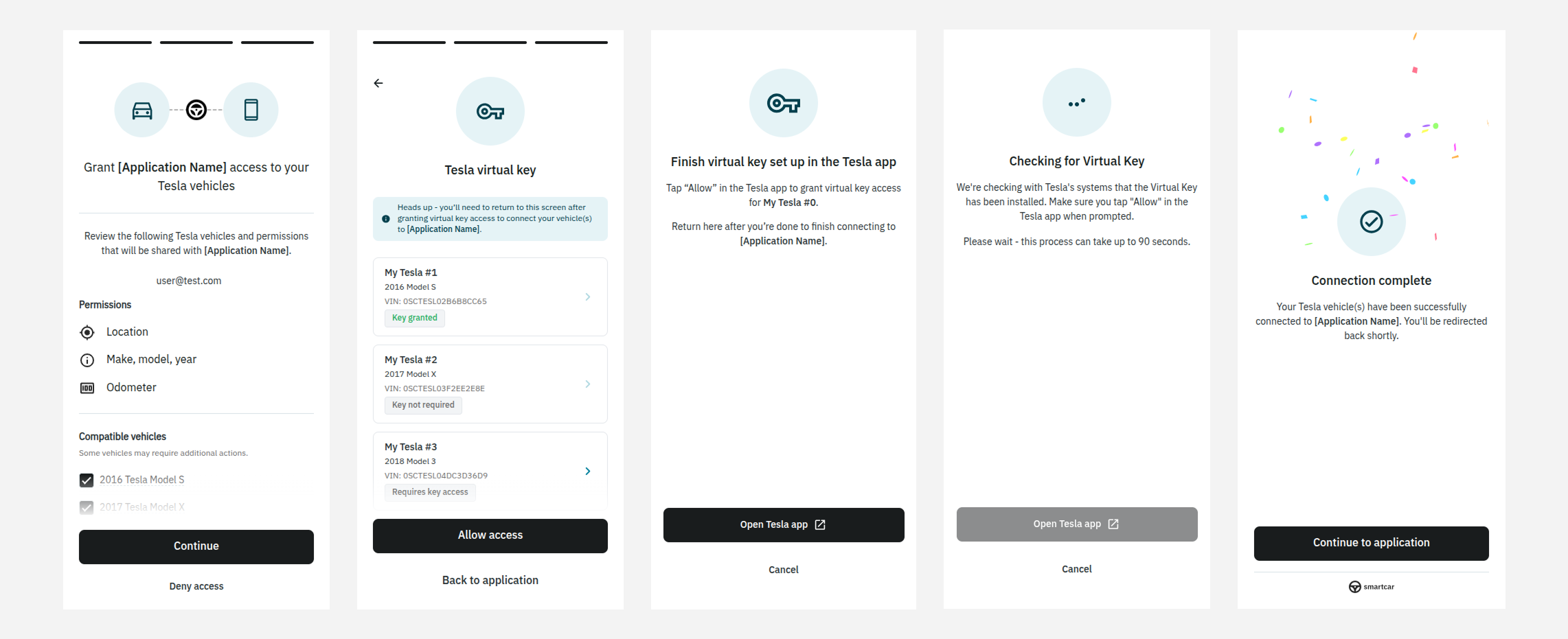
Smartcar Connect will present Tesla vehicle owners a prompt to install the Tesla Virtual Key after granting access and prior to redirecting them back to your application.
After prompting your users to open the link, depending on their device, they will be redirected to the Tesla app or prompted to scan a QR code.
Adding a Virtual Key will need to be done after a user has granted your application access to their Tesla account in the Connect flow.Please see our FAQs for details on adding a virtual key for accounts with multiple vehicles and different account types.
Mobile Device
Desktop
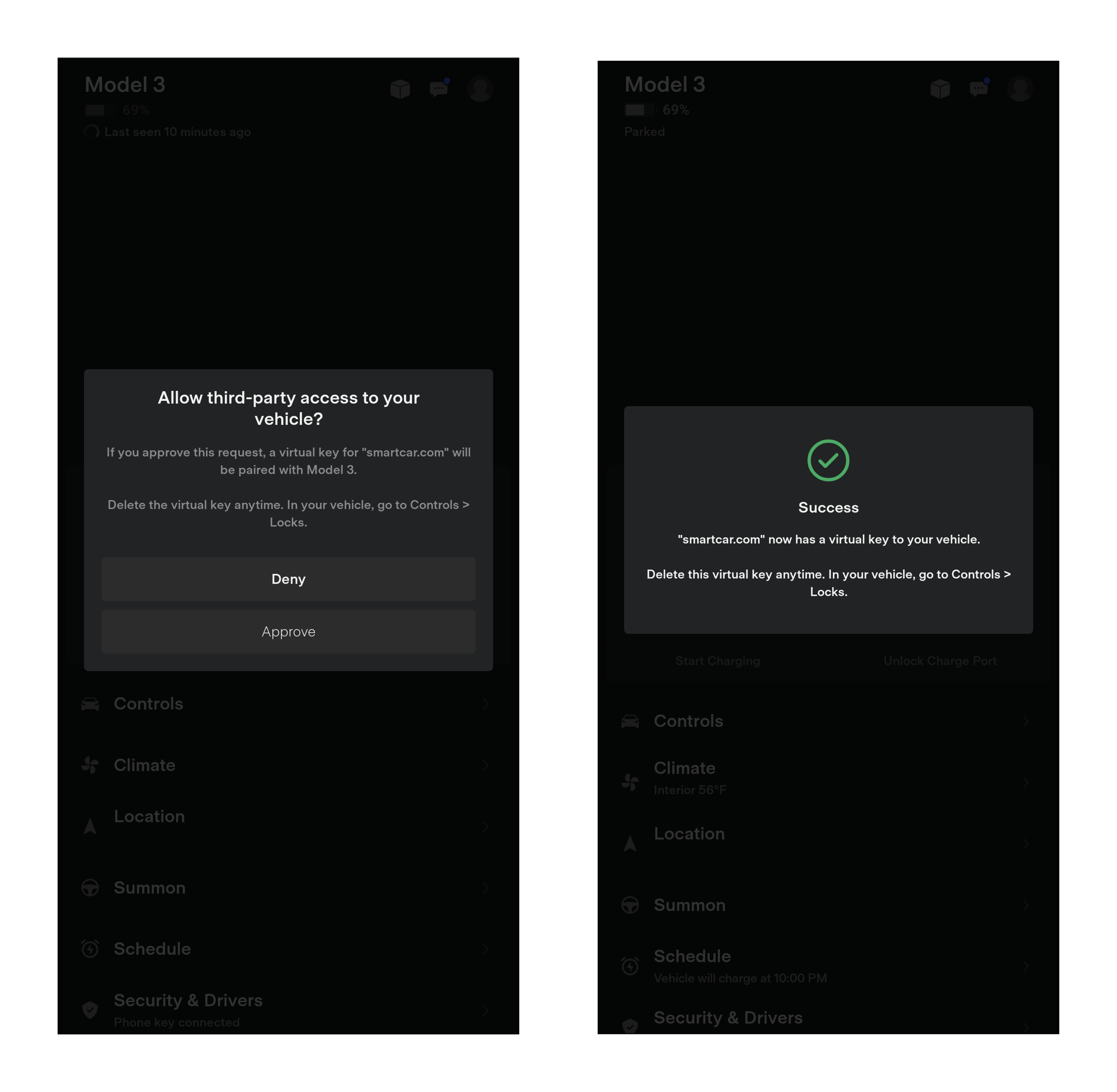
On mobile devices, they will be redirected to the Tesla app and prompted to add the Virtual Key
Opening the link on a mobile device with the Tesla app installed
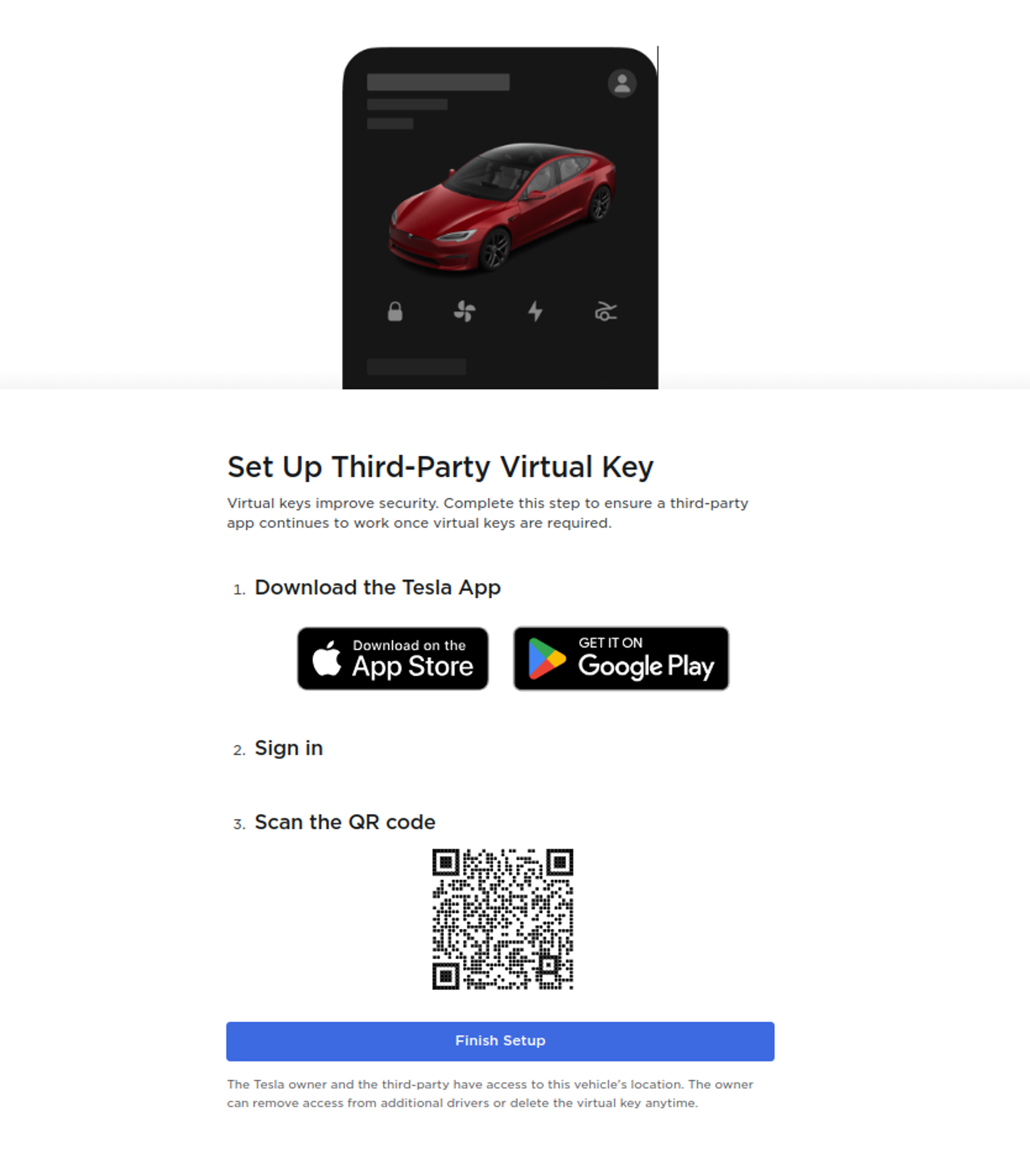
On Desktop, they will be prompted to scan the QR code which in turn opens up the Tesla app and prompts them to add a Virtual Key
Opening the link on a desktop
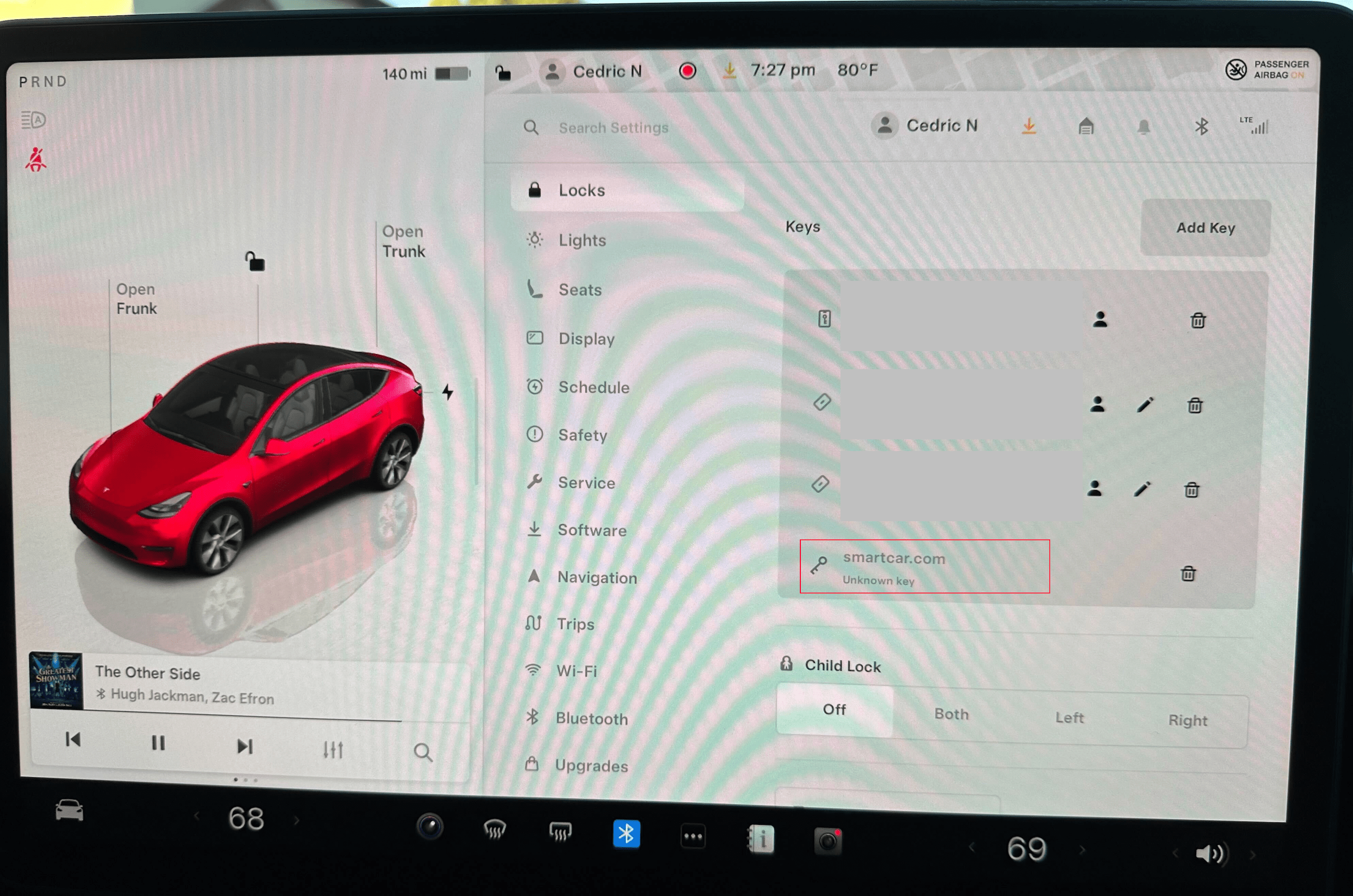
Virtual Key status can be checked at any time from the Tesla infotainment screen under Settings, Locks.
2020 and earlier Model S and X do not require a virtual key installation. However, to enable streaming data access (faster, more frequent updates), owners can enable streaming by toggling a setting within the vehicle.
For 2020 or earlier Model S or X that supports streaming (requires a software update), users can enable streaming without installing a Virtual Key:
During the Smartcar Connect flow, drivers will be prompted about enabling streaming for their vehicle
Drivers can choose to receive email instructions on how to enable the streaming toggle in their vehicle
Access the streaming settings from the Tesla infotainment screen
Toggle the streaming setting on to enable faster data updates
Once streaming is enabled via the vehicle toggle, data will be refreshed more frequently without requiring Virtual Key installation for these modals. If streaming toggle is not enabled, data for these older models is refreshed every 5 minutes while the vehicle is awake.
What if a streaming capable vehicle does not have a virtual key installed?
If a vehicle is streaming capable via virtual key and does not yet have a virtual key installed,
requests to the vehicle will be limited to 1 request every 8 hours for data. These requests will
not wake the vehicle.
Was this page helpful?
{"docsConfig":{"theme":"mint","$schema":"https://mintlify.com/docs.json","name":"smartcar","colors":{"primary":"#3E577D","light":"#3E577D","dark":"#3E577D"},"logo":{"light":"https://mintcdn.com/smartcar-docs/YqcNJdgEDgXpXtEG/logo/light.png?fit=max\u0026auto=format\u0026n=YqcNJdgEDgXpXtEG\u0026q=85\u0026s=c8947958467fe403a12f769afada9b53","dark":"https://mintcdn.com/smartcar-docs/YqcNJdgEDgXpXtEG/logo/dark.png?fit=max\u0026auto=format\u0026n=YqcNJdgEDgXpXtEG\u0026q=85\u0026s=af6b6bcabc2fe0bc4bbd976ee5b71a36","href":"https://smartcar.com/"},"favicon":"https://mintcdn.com/smartcar-docs/NtuX9OSBHLxFwWIa/favicon.png?fit=max\u0026auto=format\u0026n=NtuX9OSBHLxFwWIa\u0026q=85\u0026s=de01fc4e56d5368d441e322ac50e3f81","api":{"playground":{"display":"interactive","proxy":false},"examples":{"prefill":true}},"navbar":{"links":[{"href":"https://dashboard.smartcar.com/login/","label":"Log in"},{"href":"https://dashboard.smartcar.com/signup/","label":"Sign up"}],"primary":{"type":"button","label":"Request a Demo","href":"https://smartcar.com/pricing/"}},"footer":{"socials":{"linkedin":"https://www.linkedin.com/company/smartcar","github":"https://github.com/smartcar","facebook":"https://www.facebook.com/smartcar","instagram":"https://www.instagram.com/mysmartcar","x":"https://x.com/mysmartcar"},"links":[{"header":"Product","items":[{"label":"Vehicle signals","href":"https://smartcar.com/product/signals"},{"label":"Vehicle commands","href":"https://smartcar.com/product/commands"},{"label":"Compatible brands","href":"https://smartcar.com/product/compatible-vehicles"},{"label":"Connect","href":"https://smartcar.com/product/connect"},{"label":"Integrations","href":"https://smartcar.com/product/integrations"},{"label":"Global coverage","href":"https://smartcar.com/global"},{"label":"Teams","href":"https://smartcar.com/product/teams"},{"label":"Vehicle management","href":"https://smartcar.com/product/vehicle-management"},{"label":"Analytics","href":"https://smartcar.com/product/analytics"},{"label":"Pricing","href":"https://smartcar.com/pricing"},{"label":"Status","href":"https://status.smartcar.com/"},{"label":"Brand reliability","href":"https://brandreliability.smartcar.com/"},{"label":"Data security","href":"https://smartcar.com/data-security"}]},{"header":"Energy Solutions","items":[{"label":"DERMs","href":"https://smartcar.com/industries/derms-software"},{"label":"Virtual Power Plants (VPPs)","href":"https://smartcar.com/industries/virtual-power-plant"},{"label":"Utilities","href":"https://smartcar.com/utilities"},{"label":"Home energy management","href":"https://smartcar.com/industries/home-energy-management"},{"label":"EV charging networks","href":"https://smartcar.com/industries/ev-charging"},{"label":"Charge point operators","href":"https://smartcar.com/industries/charge-point-operator"},{"label":"E-mobility service providers","href":"https://smartcar.com/industries/e-mobility-service-providers"}]},{"header":"Solutions","items":[{"label":"Repair and maintenance","href":"https://smartcar.com/industries/repair-maintenance"},{"label":"Autocare software","href":"https://smartcar.com/industries/autocare-software"},{"label":"Auto dealership","href":"https://smartcar.com/industries/auto-dealership-software"},{"label":"Roadside assistance","href":"https://smartcar.com/industries/roadside-assistance"},{"label":"Vehicle history reports","href":"https://smartcar.com/industries/vehicle-history-reports"},{"label":"Small fleet management","href":"https://smartcar.com/industries/fleet-management"},{"label":"Car subscription service","href":"https://smartcar.com/industries/car-subscription-services"},{"label":"Car sharing","href":"https://smartcar.com/industries/car-sharing"},{"label":"Ride hailing","href":"https://smartcar.com/industries/ride-sharing"},{"label":"Car rentals","href":"https://smartcar.com/industries/car-rental"},{"label":"Auto insurance","href":"https://smartcar.com/industries/auto-insurance"},{"label":"Warranty software","href":"https://smartcar.com/industries/warranty-management-software"},{"label":"Road usage charge","href":"https://smartcar.com/industries/road-usage-charge"}]},{"header":"Resources","items":[{"label":"Customers","href":"https://smartcar.com/customers"},{"label":"Blog","href":"https://smartcar.com/blog"},{"label":"For vehicle owners","href":"https://smartcar.com/vehicle-owners"},{"label":"For automakers","href":"https://smartcar.com/automakers"},{"label":"Terms of service","href":"https://smartcar.com/legal/terms"},{"label":"Privacy policy","href":"https://smartcar.com/legal/privacy"},{"label":"End user privacy policy","href":"https://smartcar.com/legal/end-user-privacy"},{"label":"Acceptable use","href":"https://smartcar.com/legal/acceptable-use"},{"label":"Data processing","href":"https://smartcar.com/legal/dpa"},{"label":"Vulnerability disclosure program","href":"https://smartcar.com/vdp"},{"label":"mySmartcar","href":"https://my.smartcar.com"}]}]},"search":{"prompt":"✨ Ask Smartcar"},"integrations":{"koala":{"publicApiKey":"pk_3a64cc4d12d7b978edffae0afd143df5b291"},"ga4":{"measurementId":"G-QHNXS91VZC"}},"styling":{"latex":true},"navigation":{"pages":[]}},"deployment":{"deploymentMetadataValue":{"subdomain":"smartcar-docs","hasAudioNarration":false,"actualSubdomain":"smartcar-docs","customDomains":["smartcar.com"],"gitSource":{"type":"github","owner":"smartcar","repo":"docs","deployBranch":"main","contentDirectory":"","isPrivate":false,"mountPath":"","label":""},"chroma":{"liveDeploymentHistoryId":"6adbe250d05dd52d1c87e7c2","collectionId":"4e81bf89-a564-4084-82d5-a2f1a4b41ad6","schemaVersion":"v3","latestBuiltDeploymentHistoryId":"6adbe250d05dd52d1c87e7c2"},"feedback":{"thumbs":true},"entitlements":{"AI_CHAT":{"status":"ENABLED"},"REMOVE_BRANDING":{"status":"ENABLED"},"CONTEXTUAL_FEEDBACK":{"status":"ENABLED"},"CODE_SNIPPET_FEEDBACK":{"status":"ENABLED"},"WEB_MCP":{"status":"ENABLED"},"NARRATION":{"status":"ENABLED"}},"buildId":"6adbe250d05dd52d1c87e7c2","clientVersion":"0.0.4044","searchFilterCounts":[{"language":"default","tag":"API \u0026 Integrations Reference","count":147},{"language":"default","tag":"API 2.0 Reference (Legacy)","count":64},{"language":"default","tag":"Vehicle Data","count":48},{"language":"default","tag":"Help Center","count":36},{"language":"default","tag":"Getting Started","count":28},{"language":"default","tag":"Make Specific","count":27},{"language":"default","tag":"Introduction","count":26},{"language":"default","tag":"Tesla","count":26},{"language":"default","tag":"Webhooks","count":25},{"language":"default","tag":"Errors","count":20}]},"assistantConfig":{},"basePath":"/docs","hasChatPermissions":true,"hasWebMcpPermissions":true,"toggles":[{"name":"kill-isr","enabled":true,"variant":{"name":"disabled","enabled":false,"feature_enabled":true},"impressionData":false},{"name":"agent-mintlify-slack","enabled":true,"variant":{"name":"disabled","enabled":false,"feature_enabled":true},"impressionData":false},{"name":"agent-integrations-settings","enabled":true,"variant":{"name":"disabled","enabled":false,"feature_enabled":true},"impressionData":false},{"name":"automations-pr-grouping","enabled":true,"variant":{"name":"disabled","enabled":false,"feature_enabled":true},"impressionData":false},{"name":"custom-prefix","enabled":true,"variant":{"name":"disabled","enabled":false,"feature_enabled":true},"impressionData":false},{"name":"analytics-v7","enabled":true,"variant":{"name":"disabled","enabled":false,"feature_enabled":true},"impressionData":false},{"name":"user-flows-analytics","enabled":true,"variant":{"name":"disabled","enabled":false,"feature_enabled":true},"impressionData":false},{"name":"no-publish-flow","enabled":true,"variant":{"name":"disabled","enabled":false,"feature_enabled":true},"impressionData":false},{"name":"workos-onboarding","enabled":true,"variant":{"name":"disabled","enabled":false,"feature_enabled":true},"impressionData":false},{"name":"llms-txt-v2","enabled":true,"variant":{"name":"disabled","enabled":false,"feature_enabled":true},"impressionData":false},{"name":"snapshot-serving-live","enabled":true,"variant":{"name":"disabled","enabled":false,"feature_enabled":true},"impressionData":false},{"name":"stripTemperatureMiddleware","enabled":true,"variant":{"name":"disabled","enabled":false,"feature_enabled":true},"impressionData":false},{"name":"support-platform-pylon-zendesk","enabled":true,"variant":{"name":"disabled","enabled":false,"feature_enabled":true},"impressionData":false},{"name":"snapshot-serving","enabled":true,"variant":{"name":"disabled","enabled":false,"feature_enabled":true},"impressionData":false},{"name":"instant-rollback","enabled":true,"variant":{"name":"disabled","enabled":false,"feature_enabled":true},"impressionData":false},{"name":"granular-notifications-server","enabled":true,"variant":{"name":"disabled","enabled":false,"feature_enabled":true},"impressionData":false},{"name":"granular-notifications","enabled":true,"variant":{"name":"disabled","enabled":false,"feature_enabled":true},"impressionData":false},{"name":"automations-fable","enabled":true,"variant":{"name":"disabled","enabled":false,"feature_enabled":true},"impressionData":false},{"name":"fixed-ai-action-pricing","enabled":true,"variant":{"name":"disabled","enabled":false,"feature_enabled":true},"impressionData":false},{"name":"automation-resolve-merge-conflict","enabled":true,"variant":{"name":"disabled","enabled":false,"feature_enabled":true},"impressionData":false},{"name":"scoped-publishing","enabled":true,"variant":{"name":"disabled","enabled":false,"feature_enabled":true},"impressionData":false},{"name":"mintql","enabled":true,"variant":{"name":"disabled","enabled":false,"feature_enabled":true},"impressionData":false},{"name":"page-level-analytics","enabled":true,"variant":{"name":"disabled","enabled":false,"feature_enabled":true},"impressionData":false},{"name":"editor-version-history-v2","enabled":true,"variant":{"name":"disabled","enabled":false,"feature_enabled":true},"impressionData":false},{"name":"billing-page-v2","enabled":true,"variant":{"name":"disabled","enabled":false,"feature_enabled":true},"impressionData":false},{"name":"full-page-search","enabled":true,"variant":{"name":"disabled","enabled":false,"feature_enabled":true},"impressionData":false},{"name":"workspace-projects","enabled":true,"variant":{"name":"disabled","enabled":false,"feature_enabled":true},"impressionData":false},{"name":"assistant-v5","enabled":true,"variant":{"name":"disabled","enabled":false,"feature_enabled":true},"impressionData":false},{"name":"byok-sep-25","enabled":true,"variant":{"name":"disabled","enabled":false,"feature_enabled":true},"impressionData":false},{"name":"fork-pr-previews","enabled":true,"variant":{"name":"disabled","enabled":false,"feature_enabled":true},"impressionData":false},{"name":"revalidation-jwt","enabled":true,"variant":{"name":"disabled","enabled":false,"feature_enabled":true},"impressionData":false},{"name":"vite-origin","enabled":true,"variant":{"name":"disabled","enabled":false,"feature_enabled":true},"impressionData":false},{"name":"billing-updated-9-15","enabled":true,"variant":{"name":"disabled","enabled":false,"feature_enabled":true},"impressionData":false},{"name":"workos-sso-scim","enabled":true,"variant":{"name":"disabled","enabled":false,"feature_enabled":true},"impressionData":false},{"name":"hobby-abuse-scan","enabled":true,"variant":{"name":"disabled","enabled":false,"feature_enabled":true},"impressionData":false},{"name":"dashboard-inbox","enabled":true,"variant":{"name":"disabled","enabled":false,"feature_enabled":true},"impressionData":false},{"name":"workos-signup","enabled":true,"variant":{"name":"disabled","enabled":false,"feature_enabled":true},"impressionData":false},{"name":"turbopuffer-dual-write","enabled":true,"variant":{"name":"disabled","enabled":false,"feature_enabled":true},"impressionData":false},{"name":"workos-enabled","enabled":true,"variant":{"name":"disabled","enabled":false,"feature_enabled":true},"impressionData":false},{"name":"approve-review-flow","enabled":true,"variant":{"name":"disabled","enabled":false,"feature_enabled":true},"impressionData":false},{"name":"sso-setup-deadline-banner","enabled":true,"variant":{"name":"disabled","enabled":false,"feature_enabled":true},"impressionData":false}],"googleFontsInlined":false},"customCss":[{"filePath":"style.css","content":".hsfc-Form .hsfc-FieldLabel span:is(.dark *),.hsfc-Form .hsfc-RichText p:is(.dark *),.hsfc-PostSubmit .hsfc-RichText p:is(.dark *){color:#a0a1a2}.dark\\:text-primary-light:is(.dark *){color:#378ff0}.hsfc-FormWrapper .hsfc-Step .hsfc-Step__Content{padding:0 10px 20px;background-color:rgb(113 113 122/10%);border-radius:10px}.hsfc-FormWrapper .hsfc-Step .hsfc-Step__Content .hsfc-Row{margin-bottom:4px}.hsfc-FormWrapper .hsfc-Step .hsfc-Step__Content .hsfc-NavigationRow{margin-top:4px}.osano-cm-powered-by__link.osano-cm-link,.osano-cm-window__widget{display:none}.osano-cm-close svg{stroke:#fff!important}.osano-cm-dialog{font-family:Inter,ui-sans-serif,system-ui,sans-serif;border-radius:12px;box-shadow:0 -4px 24px rgba(0,0,0,.08);padding:20px 24px;background-color:#fff;color:#374151;border-top:1px solid #e5e7eb}.osano-cm-dialog__title{font-size:.9rem;font-weight:600;color:#111827;margin-bottom:6px}.osano-cm-dialog__description,.osano-cm-message{font-size:.825rem;color:#6b7280;line-height:1.5}.osano-cm-storage-policy{font-size:.825rem;line-height:1.5}.osano-cm-message:is(.dark *){color:#fff}.osano-cm-info a,.osano-cm-storage-policy{color:#3e577d}.osano-cm-button{font-family:Inter,ui-sans-serif,system-ui,sans-serif;font-size:.825rem;font-weight:500;border-radius:6px;padding:7px 14px;transition:opacity .15s ease}.osano-cm-button:hover{opacity:.85}.osano-cm-accept,.osano-cm-button--save,.osano-cm-save{background-color:#3e577d!important;color:#fff!important;border:0!important}.osano-cm-deny,.osano-cm-manage{background-color:transparent!important;color:#3e577d!important;border:1px solid #3e577d!important}.osano-cm-manage{border:0!important;padding-left:4px!important;padding-right:4px!important;text-decoration:underline;text-underline-offset:2px}.osano-cm-dialog:is(.dark *){background-color:#1f2937;color:#d1d5db;border-top-color:#374151;box-shadow:0 -4px 24px rgba(0,0,0,.3)}.osano-cm-dialog__title:is(.dark *){color:#f9fafb}.osano-cm-dialog__description:is(.dark *){color:#9ca3af}.osano-cm-info a:is(.dark *),.osano-cm-storage-policy:is(.dark *){color:#93b4d8}.osano-cm-deny:is(.dark *){color:#93b4d8!important;border-color:#93b4d8!important}.osano-cm-manage:is(.dark *){color:#93b4d8!important}.osano-cm-info{font-family:Inter,ui-sans-serif,system-ui,sans-serif;border-radius:0;box-shadow:0 -4px 24px rgba(0,0,0,.08);background-color:#fff;color:#374151;border-top:1px solid #e5e7eb;min-width:480px;overflow-y:visible}.osano-cm-header,.osano-cm-info-dialog-header{background-color:#fff!important}.osano-cm-info__title{font-size:.9rem;font-weight:600;color:#111827}.osano-cm-info__description,.osano-cm-info__list{font-size:.825rem;color:#6b7280;line-height:1.5}.osano-cm-toggle__switch{background-color:#e5e7eb!important;border-color:#3e577d!important}.osano-cm-toggle__input:checked+.osano-cm-toggle__switch{background-color:#3e577d!important;border-color:#3e577d!important}.osano-cm-toggle__input:checked+.osano-cm-toggle__switch::after{background-color:#e5e7eb!important}.osano-cm-info:is(.dark *){background-color:#1f2937;color:#d1d5db;border-top-color:#374151;box-shadow:0 -4px 24px rgba(0,0,0,.3)}.osano-cm-header:is(.dark *),.osano-cm-info-dialog-header:is(.dark *){background-color:#1f2937!important}.osano-cm-info__title:is(.dark *){color:#f9fafb}.osano-cm-info__description:is(.dark *),.osano-cm-info__list:is(.dark *){color:#9ca3af}.osano-cm-toggle__switch:is(.dark *){background-color:#374151!important}"}],"page":{"pagePath":"help/oem-integrations/tesla/virtual-key-tesla","slug":"/help/oem-integrations/tesla/virtual-key-tesla","pageMetadata":{"title":"Virtual Keys","sidebarTitle":"Virtual Keys","description":"This page has information regarding the use of Virtual Keys for Tesla vehicles.","href":"/help/oem-integrations/tesla/virtual-key-tesla"},"description":{"compiledSource":"\"use strict\";\nconst {jsx: _jsx} = arguments[0];\nconst {useMDXComponents: _provideComponents} = arguments[0];\nfunction _createMdxContent(props) {\n const _components = {\n p: \"p\",\n ..._provideComponents(),\n ...props.components\n };\n return _jsx(_components.p, {\n children: \"This page has information regarding the use of Virtual Keys for Tesla vehicles.\"\n });\n}\nfunction MDXContent(props = {}) {\n const {wrapper: MDXLayout} = {\n ..._provideComponents(),\n ...props.components\n };\n return MDXLayout ? _jsx(MDXLayout, {\n ...props,\n children: _jsx(_createMdxContent, {\n ...props\n })\n }) : _createMdxContent(props);\n}\nreturn {\n default: MDXContent\n};\n","frontmatter":{},"scope":{}},"pageType":"default","mdx":{"mdxSource":{"compiledSource":"\"use strict\";const{Fragment:_Fragment,jsx:_jsx,jsxs:_jsxs}=arguments[0];const{useMDXComponents:_provideComponents}=arguments[0];function _createMdxContent(props){const _components={a:`a`,code:`code`,li:`li`,ol:`ol`,p:`p`,pre:`pre`,span:`span`,strong:`strong`,..._provideComponents(),...props.components},{CodeBlock,Frame,Heading,OptimizedImage,Tab,Tabs,Tip}=_components;if(!CodeBlock)_missingMdxReference(`CodeBlock`,true);if(!Frame)_missingMdxReference(`Frame`,true);if(!Heading)_missingMdxReference(`Heading`,true);if(!OptimizedImage)_missingMdxReference(`OptimizedImage`,true);if(!Tab)_missingMdxReference(`Tab`,true);if(!Tabs)_missingMdxReference(`Tabs`,true);if(!Tip)_missingMdxReference(`Tip`,true);return _jsxs(_Fragment,{children:[_jsx(Heading,{level:`2`,id:`what-is-a-virtual-key`,children:`What is a Virtual Key?`}),`\n`,_jsxs(_components.p,{children:[`A Virtual Key is a digital access method required by Tesla for third-party\napplications to issue commands to Tesla vehicles and the preferred method for accessing data.\nPlease see `,_jsx(_components.a,{href:`/help/oem-integrations/tesla/virtual-key-tesla#adding-the-virtual-key`,children:`this\nsection`}),`\nfor more information.`]}),`\n`,_jsx(Heading,{level:`3`,id:`adding-the-virtual-key`,children:`Adding the Virtual Key`}),`\n`,_jsx(_components.p,{children:`Smartcar handles this step on your behalf in the Connect flow. You can get started with the default Smartcar Virtual Key with no configurations required.`}),`\n`,_jsxs(_components.p,{children:[`If you’re on an `,_jsx(_components.strong,{children:`Enterprise`}),` plan, please reach out to your Account Manager or\nSolutions Architect for information on setting up a custom Virtual Key with your own brand name.`]}),`\n`,_jsx(Heading,{level:`2`,id:`where-can-i-find-my-virtual-key`,children:`Where can I find my Virtual Key?`}),`\n`,_jsx(_components.p,{children:`Although Smartcar handles this step on your behalf, the Virtual Key URL for your application is sent back along with the authorization code after a user completes the Connect flow. You can redirect users to this URL if they need to add the Virtual Key again.`}),`\n`,_jsx(Heading,{level:`3`,id:`vehicle-owners-adding-a-virtual-key`,children:`Vehicle Owners adding a Virtual Key`}),`\n`,_jsx(_components.p,{children:`Smartcar Connect will present Tesla vehicle owners a prompt to install the Tesla Virtual Key after granting access and prior to redirecting them back to your application.`}),`\n`,_jsx(Frame,{caption:`Prompting the user to add a Virtual Key`,children:_jsx(OptimizedImage,{width:`700`,src:`https://mintcdn.com/smartcar-docs/bl2aLGyZU43A919o/images/help-center/oem-integrations/tesla/add-virtual-key/VirtualKeyPageMobile.png?fit=max\u0026auto=format\u0026n=bl2aLGyZU43A919o\u0026q=85\u0026s=e504d181b6936f3e0ba17926a2923be2`,\"data-og-width\":`2283`,\"data-og-height\":`931`,\"data-path\":`images/help-center/oem-integrations/tesla/add-virtual-key/VirtualKeyPageMobile.png`,\"data-optimize\":`true`,\"data-opv\":`3`,srcset:`https://mintcdn.com/smartcar-docs/bl2aLGyZU43A919o/images/help-center/oem-integrations/tesla/add-virtual-key/VirtualKeyPageMobile.png?w=280\u0026fit=max\u0026auto=format\u0026n=bl2aLGyZU43A919o\u0026q=85\u0026s=02c5b864bdd1e8c5541ed1a1bfc80549 280w, https://mintcdn.com/smartcar-docs/bl2aLGyZU43A919o/images/help-center/oem-integrations/tesla/add-virtual-key/VirtualKeyPageMobile.png?w=560\u0026fit=max\u0026auto=format\u0026n=bl2aLGyZU43A919o\u0026q=85\u0026s=a1ca3a12ee41154e396ae4ce1b56af65 560w, https://mintcdn.com/smartcar-docs/bl2aLGyZU43A919o/images/help-center/oem-integrations/tesla/add-virtual-key/VirtualKeyPageMobile.png?w=840\u0026fit=max\u0026auto=format\u0026n=bl2aLGyZU43A919o\u0026q=85\u0026s=89747ff417caaf5f36b30737aa24bd0a 840w, https://mintcdn.com/smartcar-docs/bl2aLGyZU43A919o/images/help-center/oem-integrations/tesla/add-virtual-key/VirtualKeyPageMobile.png?w=1100\u0026fit=max\u0026auto=format\u0026n=bl2aLGyZU43A919o\u0026q=85\u0026s=6f5036a32588937a17a0ea6fb0adc4bb 1100w, https://mintcdn.com/smartcar-docs/bl2aLGyZU43A919o/images/help-center/oem-integrations/tesla/add-virtual-key/VirtualKeyPageMobile.png?w=1650\u0026fit=max\u0026auto=format\u0026n=bl2aLGyZU43A919o\u0026q=85\u0026s=3e4e9358fb3e91fc7e6b1ad8bc7bac0d 1650w, https://mintcdn.com/smartcar-docs/bl2aLGyZU43A919o/images/help-center/oem-integrations/tesla/add-virtual-key/VirtualKeyPageMobile.png?w=2500\u0026fit=max\u0026auto=format\u0026n=bl2aLGyZU43A919o\u0026q=85\u0026s=b8b9c2e23830523d41d1c9c753d3b309 2500w`})}),`\n`,_jsx(_components.p,{children:`The Virtual Key is a URL in the form:`}),`\n`,_jsxs(Tabs,{children:[_jsx(Tab,{title:`Free or Build Plans`,id:`free-or-build-plans`,children:_jsx(CodeBlock,{numberOfLines:`2`,language:`text`,children:_jsx(_components.pre,{className:`shiki shiki-themes github-light-default dark-plus`,style:{backgroundColor:`#ffffff`,\"--shiki-dark-bg\":`#0B0C0E`,color:`#1f2328`,\"--shiki-dark\":`#D4D4D4`},language:`text`,children:_jsxs(_components.code,{language:`text`,numberOfLines:`2`,children:[_jsx(_components.span,{className:`line`,children:_jsx(_components.span,{children:`https://www.tesla.com/_ak/smartcar.com`})}),`\n`,_jsx(_components.span,{className:`line`,children:_jsx(_components.span,{})})]})})})}),_jsx(Tab,{title:`Enterprise Plan`,id:`enterprise-plan`,children:_jsx(CodeBlock,{numberOfLines:`2`,language:`text`,children:_jsx(_components.pre,{className:`shiki shiki-themes github-light-default dark-plus`,style:{backgroundColor:`#ffffff`,\"--shiki-dark-bg\":`#0B0C0E`,color:`#1f2328`,\"--shiki-dark\":`#D4D4D4`},language:`text`,children:_jsxs(_components.code,{language:`text`,numberOfLines:`2`,children:[_jsx(_components.span,{className:`line`,children:_jsx(_components.span,{children:`https://www.tesla.com/_ak/{{custom_subdomain}}.app.car`})}),`\n`,_jsx(_components.span,{className:`line`,children:_jsx(_components.span,{})})]})})})})]}),`\n`,_jsx(_components.p,{children:`After prompting your users to open the link, depending on their device, they will be redirected to the Tesla app or prompted to scan a QR code.`}),`\n`,_jsxs(Tip,{children:[_jsx(_components.p,{children:`Adding a Virtual Key will need to be done after a user has granted your application access to their Tesla account in the Connect flow.`}),_jsxs(_components.p,{children:[`Please see our `,_jsx(_components.a,{href:`/help/oem-integrations/tesla/faqs#can-owner-and-driver-accounts-authorize-access-with-smartcar-through-connect`,children:`FAQs`}),` for details on adding a virtual key for accounts with multiple vehicles and different account types.`]})]}),`\n`,_jsxs(Tabs,{children:[_jsxs(Tab,{title:`Mobile Device`,id:`mobile-device`,children:[_jsx(_components.p,{children:`On mobile devices, they will be redirected to the Tesla app and prompted to add the Virtual Key`}),_jsx(Frame,{caption:`Opening the link on a mobile device with the Tesla app installed`,children:_jsx(OptimizedImage,{width:`600`,src:`https://mintcdn.com/smartcar-docs/bl2aLGyZU43A919o/images/help-center/oem-integrations/tesla/add-virtual-key/mobile.png?fit=max\u0026auto=format\u0026n=bl2aLGyZU43A919o\u0026q=85\u0026s=1aa3cfa6758a83b3c5384019c8ce9516`,\"data-og-width\":`4964`,\"data-og-height\":`4854`,\"data-path\":`images/help-center/oem-integrations/tesla/add-virtual-key/mobile.png`,\"data-optimize\":`true`,\"data-opv\":`3`,srcset:`https://mintcdn.com/smartcar-docs/bl2aLGyZU43A919o/images/help-center/oem-integrations/tesla/add-virtual-key/mobile.png?w=280\u0026fit=max\u0026auto=format\u0026n=bl2aLGyZU43A919o\u0026q=85\u0026s=38179fb64a3f35c9c6412881a41f63a2 280w, https://mintcdn.com/smartcar-docs/bl2aLGyZU43A919o/images/help-center/oem-integrations/tesla/add-virtual-key/mobile.png?w=560\u0026fit=max\u0026auto=format\u0026n=bl2aLGyZU43A919o\u0026q=85\u0026s=dd132f40eaf0ac8ce3f8c06a4a49937a 560w, https://mintcdn.com/smartcar-docs/bl2aLGyZU43A919o/images/help-center/oem-integrations/tesla/add-virtual-key/mobile.png?w=840\u0026fit=max\u0026auto=format\u0026n=bl2aLGyZU43A919o\u0026q=85\u0026s=d1f968b7d55de343324b9c34fa1445ae 840w, https://mintcdn.com/smartcar-docs/bl2aLGyZU43A919o/images/help-center/oem-integrations/tesla/add-virtual-key/mobile.png?w=1100\u0026fit=max\u0026auto=format\u0026n=bl2aLGyZU43A919o\u0026q=85\u0026s=40b9a8fa4ac2c2060da42b5cf08d849b 1100w, https://mintcdn.com/smartcar-docs/bl2aLGyZU43A919o/images/help-center/oem-integrations/tesla/add-virtual-key/mobile.png?w=1650\u0026fit=max\u0026auto=format\u0026n=bl2aLGyZU43A919o\u0026q=85\u0026s=a01aa61cae09b50959b4f8d03936e056 1650w, https://mintcdn.com/smartcar-docs/bl2aLGyZU43A919o/images/help-center/oem-integrations/tesla/add-virtual-key/mobile.png?w=2500\u0026fit=max\u0026auto=format\u0026n=bl2aLGyZU43A919o\u0026q=85\u0026s=2978ca715f21ff393c8a6fcd150d6b96 2500w`})})]}),_jsxs(Tab,{title:`Desktop`,id:`desktop`,children:[_jsx(_components.p,{children:`On Desktop, they will be prompted to scan the QR code which in turn opens up the Tesla app and prompts them to add a Virtual Key`}),_jsx(Frame,{caption:`Opening the link on a desktop`,children:_jsx(OptimizedImage,{width:`600`,src:`https://mintcdn.com/smartcar-docs/bl2aLGyZU43A919o/images/help-center/oem-integrations/tesla/add-virtual-key/desktop.png?fit=max\u0026auto=format\u0026n=bl2aLGyZU43A919o\u0026q=85\u0026s=d23186ba53fe3df10da5569734e35a55`,\"data-og-width\":`2000`,\"data-og-height\":`2283`,\"data-path\":`images/help-center/oem-integrations/tesla/add-virtual-key/desktop.png`,\"data-optimize\":`true`,\"data-opv\":`3`,srcset:`https://mintcdn.com/smartcar-docs/bl2aLGyZU43A919o/images/help-center/oem-integrations/tesla/add-virtual-key/desktop.png?w=280\u0026fit=max\u0026auto=format\u0026n=bl2aLGyZU43A919o\u0026q=85\u0026s=1fef759823638e7e4bef332c9ecc2746 280w, https://mintcdn.com/smartcar-docs/bl2aLGyZU43A919o/images/help-center/oem-integrations/tesla/add-virtual-key/desktop.png?w=560\u0026fit=max\u0026auto=format\u0026n=bl2aLGyZU43A919o\u0026q=85\u0026s=b540a6e8a73a09c2335212f7e76cc83d 560w, https://mintcdn.com/smartcar-docs/bl2aLGyZU43A919o/images/help-center/oem-integrations/tesla/add-virtual-key/desktop.png?w=840\u0026fit=max\u0026auto=format\u0026n=bl2aLGyZU43A919o\u0026q=85\u0026s=925d9141cba67f54650113d5b89eff78 840w, https://mintcdn.com/smartcar-docs/bl2aLGyZU43A919o/images/help-center/oem-integrations/tesla/add-virtual-key/desktop.png?w=1100\u0026fit=max\u0026auto=format\u0026n=bl2aLGyZU43A919o\u0026q=85\u0026s=fb91f775461570fbf9babf0d1aa09e3f 1100w, https://mintcdn.com/smartcar-docs/bl2aLGyZU43A919o/images/help-center/oem-integrations/tesla/add-virtual-key/desktop.png?w=1650\u0026fit=max\u0026auto=format\u0026n=bl2aLGyZU43A919o\u0026q=85\u0026s=072106f529447f5d80c34d216936f07c 1650w, https://mintcdn.com/smartcar-docs/bl2aLGyZU43A919o/images/help-center/oem-integrations/tesla/add-virtual-key/desktop.png?w=2500\u0026fit=max\u0026auto=format\u0026n=bl2aLGyZU43A919o\u0026q=85\u0026s=c64d864789f7d4e035cc4c50bf2cb7dd 2500w`})})]})]}),`\n`,_jsx(_components.p,{children:`Virtual Key status can be checked at any time from the Tesla infotainment screen under Settings, Locks.`}),`\n`,_jsx(Frame,{caption:`Check Virtual Key status from your Tesla`,children:_jsx(OptimizedImage,{width:`600`,src:`https://mintcdn.com/smartcar-docs/bl2aLGyZU43A919o/images/help-center/oem-integrations/tesla/add-virtual-key/infotainment.png?fit=max\u0026auto=format\u0026n=bl2aLGyZU43A919o\u0026q=85\u0026s=2aa353d17ed5cde11109469fd2e0a798`,\"data-og-width\":`2720`,\"data-og-height\":`1802`,\"data-path\":`images/help-center/oem-integrations/tesla/add-virtual-key/infotainment.png`,\"data-optimize\":`true`,\"data-opv\":`3`,srcset:`https://mintcdn.com/smartcar-docs/bl2aLGyZU43A919o/images/help-center/oem-integrations/tesla/add-virtual-key/infotainment.png?w=280\u0026fit=max\u0026auto=format\u0026n=bl2aLGyZU43A919o\u0026q=85\u0026s=79989c8784343f6e73094b0e0ebcf348 280w, https://mintcdn.com/smartcar-docs/bl2aLGyZU43A919o/images/help-center/oem-integrations/tesla/add-virtual-key/infotainment.png?w=560\u0026fit=max\u0026auto=format\u0026n=bl2aLGyZU43A919o\u0026q=85\u0026s=d8b4063d497c846e867109f96ee6afad 560w, https://mintcdn.com/smartcar-docs/bl2aLGyZU43A919o/images/help-center/oem-integrations/tesla/add-virtual-key/infotainment.png?w=840\u0026fit=max\u0026auto=format\u0026n=bl2aLGyZU43A919o\u0026q=85\u0026s=4df5837d63f70457f4be3a837ad565d9 840w, https://mintcdn.com/smartcar-docs/bl2aLGyZU43A919o/images/help-center/oem-integrations/tesla/add-virtual-key/infotainment.png?w=1100\u0026fit=max\u0026auto=format\u0026n=bl2aLGyZU43A919o\u0026q=85\u0026s=13e05d49490a3d98848e8045e183fb2c 1100w, https://mintcdn.com/smartcar-docs/bl2aLGyZU43A919o/images/help-center/oem-integrations/tesla/add-virtual-key/infotainment.png?w=1650\u0026fit=max\u0026auto=format\u0026n=bl2aLGyZU43A919o\u0026q=85\u0026s=b6b2d077092b08c3fb72f852f706d256 1650w, https://mintcdn.com/smartcar-docs/bl2aLGyZU43A919o/images/help-center/oem-integrations/tesla/add-virtual-key/infotainment.png?w=2500\u0026fit=max\u0026auto=format\u0026n=bl2aLGyZU43A919o\u0026q=85\u0026s=990cf7ae17b09c73129ac1eb6cf934ae 2500w`})}),`\n`,_jsx(Heading,{level:`2`,id:`do-all-vehicles-need-a-virtual-key`,children:`Do all vehicles need a virtual key?`}),`\n`,_jsxs(_components.p,{children:[`2020 and earlier Model S and X `,_jsx(_components.strong,{children:`do not`}),` require a virtual key installation. However, to enable streaming data access (faster, more frequent updates), owners can enable streaming by toggling a setting within the vehicle.`]}),`\n`,_jsx(Heading,{level:`3`,id:`enabling-streaming-for-2020-and-earlier-model-s/x`,children:`Enabling Streaming for 2020 and Earlier Model S/X`}),`\n`,_jsx(_components.p,{children:`For 2020 or earlier Model S or X that supports streaming (requires a software update), users can enable streaming without installing a Virtual Key:`}),`\n`,_jsxs(_components.ol,{children:[`\n`,_jsx(_components.li,{children:`During the Smartcar Connect flow, drivers will be prompted about enabling streaming for their vehicle`}),`\n`,_jsx(_components.li,{children:`Drivers can choose to receive email instructions on how to enable the streaming toggle in their vehicle`}),`\n`,_jsx(_components.li,{children:`Access the streaming settings from the Tesla infotainment screen`}),`\n`,_jsx(_components.li,{children:`Toggle the streaming setting on to enable faster data updates`}),`\n`]}),`\n`,_jsx(_components.p,{children:`Once streaming is enabled via the vehicle toggle, data will be refreshed more frequently without requiring Virtual Key installation for these modals. If streaming toggle is not enabled, data for these older models is refreshed every 5 minutes while the vehicle is awake.`}),`\n`,_jsx(Heading,{level:`2`,id:`what-if-a-streaming-capable-vehicle-does-not-have-a-virtual-key-installed`,children:`What if a streaming capable vehicle does not have a virtual key installed?`}),`\n`,_jsxs(_components.p,{children:[`If a vehicle is streaming capable via virtual key and does not yet have a virtual key installed,\nrequests to the vehicle will be limited to 1 request every 8 hours for data. These requests `,_jsx(_components.strong,{children:`will\nnot`}),` wake the vehicle.`]})]})}function MDXContent(props={}){const{wrapper:MDXLayout}={..._provideComponents(),...props.components};return MDXLayout?_jsx(MDXLayout,{...props,children:_jsx(_createMdxContent,{...props})}):_createMdxContent(props)}return{default:MDXContent};function _missingMdxReference(id,component){throw new Error(`Expected `+(component?`component`:`object`)+\" `\"+id+\"` to be defined: you likely forgot to import, pass, or provide it.\")}","frontmatter":{},"scope":{"config":{},"pageMetadata":{"title":"Virtual Keys","sidebarTitle":"Virtual Keys","description":"This page has information regarding the use of Virtual Keys for Tesla vehicles.","href":"/help/oem-integrations/tesla/virtual-key-tesla"}}},"mdxSourceWithNoJs":null},"mdxExtracts":{"tableOfContents":[{"title":"What is a Virtual Key?","slug":"what-is-a-virtual-key","depth":2,"children":[{"title":"Adding the Virtual Key","slug":"adding-the-virtual-key","depth":3,"children":[]}]},{"title":"Where can I find my Virtual Key?","slug":"where-can-i-find-my-virtual-key","depth":2,"children":[{"title":"Vehicle Owners adding a Virtual Key","slug":"vehicle-owners-adding-a-virtual-key","depth":3,"children":[]}]},{"title":"Do all vehicles need a virtual key?","slug":"do-all-vehicles-need-a-virtual-key","depth":2,"children":[{"title":"Enabling Streaming for 2020 and Earlier Model S/X","slug":"enabling-streaming-for-2020-and-earlier-model-s/x","depth":3,"children":[]}]},{"title":"What if a streaming capable vehicle does not have a virtual key installed?","slug":"what-if-a-streaming-capable-vehicle-does-not-have-a-virtual-key-installed","depth":2,"children":[]}],"codeExamples":{}},"jsLinks":["/docs/_mintlify/custom/smartcar-docs/079ff91450d16dd6/osano.js"],"subdomain":"smartcar-docs","siteName":"smartcar","title":"Virtual Keys - smartcar","navMaps":{"firstHrefInVersion":{},"firstHrefInLanguage":{}},"lastModified":"2026-08-27T18:55:18.802Z","originalFileLocation":"help/oem-integrations/tesla/virtual-key-tesla.mdx"},"headHtml":"\u003cscript data-mint-head>(function(){var d=document.documentElement,p=null;if(!p){try{p=localStorage.getItem(\"isDarkMode\")}catch(e){}if(p==='true')p='dark';else if(p==='false')p='light';if(p!=='light'\u0026\u0026p!=='dark'\u0026\u0026p!=='system')p=\"system\"}var r=p==='system'?(matchMedia(\"(prefers-color-scheme: dark)\").matches?'dark':'light'):p;d.classList.remove(r==='dark'?'light':'dark');d.classList.add(r);d.setAttribute(\"data-theme-preference\",p)})();\u003c/script>\u003cmeta data-mint-head name=\"description\" content=\"This page has information regarding the use of Virtual Keys for Tesla vehicles.\">\u003cmeta data-mint-head name=\"application-name\" content=\"smartcar\">\u003cmeta data-mint-head name=\"generator\" content=\"Mintlify\">\u003clink data-mint-head rel=\"icon\" type=\"image/png\" sizes=\"192x192\" href=\"/docs/mintlify-assets/_mintlify/favicons/smartcar-docs/mm2dBjYiMlWQ-TlV/_generated/favicon/android-chrome-192x192.png\" media=\"(prefers-color-scheme: light)\">\u003clink data-mint-head rel=\"apple-touch-icon\" type=\"image/png\" sizes=\"180x180\" href=\"/docs/mintlify-assets/_mintlify/favicons/smartcar-docs/mm2dBjYiMlWQ-TlV/_generated/favicon/apple-touch-icon.png\">\u003clink data-mint-head rel=\"icon\" type=\"image/png\" sizes=\"16x16\" href=\"/docs/mintlify-assets/_mintlify/favicons/smartcar-docs/mm2dBjYiMlWQ-TlV/_generated/favicon/favicon-16x16.png\" media=\"(prefers-color-scheme: light)\">\u003clink data-mint-head rel=\"icon\" type=\"image/png\" sizes=\"32x32\" href=\"/docs/mintlify-assets/_mintlify/favicons/smartcar-docs/mm2dBjYiMlWQ-TlV/_generated/favicon/favicon-32x32.png\" media=\"(prefers-color-scheme: light)\">\u003clink data-mint-head rel=\"shortcut icon\" type=\"image/x-icon\" href=\"/docs/mintlify-assets/_mintlify/favicons/smartcar-docs/mm2dBjYiMlWQ-TlV/_generated/favicon/favicon.ico\" media=\"(prefers-color-scheme: light)\">\u003clink data-mint-head rel=\"icon\" type=\"image/png\" sizes=\"192x192\" href=\"/docs/mintlify-assets/_mintlify/favicons/smartcar-docs/mm2dBjYiMlWQ-TlV/_generated/favicon-dark/android-chrome-192x192.png\" media=\"(prefers-color-scheme: dark)\">\u003clink data-mint-head rel=\"icon\" type=\"image/png\" sizes=\"16x16\" href=\"/docs/mintlify-assets/_mintlify/favicons/smartcar-docs/mm2dBjYiMlWQ-TlV/_generated/favicon-dark/favicon-16x16.png\" media=\"(prefers-color-scheme: dark)\">\u003clink data-mint-head rel=\"icon\" type=\"image/png\" sizes=\"32x32\" href=\"/docs/mintlify-assets/_mintlify/favicons/smartcar-docs/mm2dBjYiMlWQ-TlV/_generated/favicon-dark/favicon-32x32.png\" media=\"(prefers-color-scheme: dark)\">\u003clink data-mint-head rel=\"shortcut icon\" type=\"image/x-icon\" href=\"/docs/mintlify-assets/_mintlify/favicons/smartcar-docs/mm2dBjYiMlWQ-TlV/_generated/favicon-dark/favicon.ico\" media=\"(prefers-color-scheme: dark)\">\u003cmeta data-mint-head property=\"og:title\" content=\"Virtual Keys - smartcar\">\u003cmeta data-mint-head property=\"og:description\" content=\"This page has information regarding the use of Virtual Keys for Tesla vehicles.\">\u003cmeta data-mint-head property=\"og:site_name\" content=\"smartcar\">\u003cmeta data-mint-head property=\"og:url\" content=\"https://smartcar.com/docs/help/oem-integrations/tesla/virtual-key-tesla\">\u003cmeta data-mint-head property=\"og:type\" content=\"website\">\u003cmeta data-mint-head property=\"og:image\" content=\"https://smartcar-docs.mintlify.app/_mintlify/api/og/v2?division=Tesla\u0026amp;title=Virtual+Keys\u0026amp;description=This+page+has+information+regarding+the+use+of+Virtual+Keys+for+Tesla+vehicles.\u0026amp;theme=254a1f83924c8d0c1b4b5b15\u0026amp;signature=f4535631435a7780c6c006f427df0b5fdbe441f7278600c3b5888be459093249\">\u003cmeta data-mint-head property=\"og:image:width\" content=\"1200\">\u003cmeta data-mint-head property=\"og:image:height\" content=\"630\">\u003cmeta data-mint-head name=\"twitter:card\" content=\"summary_large_image\">\u003cmeta data-mint-head name=\"twitter:title\" content=\"Virtual Keys - smartcar\">\u003cmeta data-mint-head name=\"twitter:description\" content=\"This page has information regarding the use of Virtual Keys for Tesla vehicles.\">\u003cmeta data-mint-head name=\"twitter:image\" content=\"https://smartcar-docs.mintlify.app/_mintlify/api/og/v2?division=Tesla\u0026amp;title=Virtual+Keys\u0026amp;description=This+page+has+information+regarding+the+use+of+Virtual+Keys+for+Tesla+vehicles.\u0026amp;theme=254a1f83924c8d0c1b4b5b15\u0026amp;signature=f4535631435a7780c6c006f427df0b5fdbe441f7278600c3b5888be459093249\">\u003cmeta data-mint-head name=\"twitter:image:width\" content=\"1200\">\u003cmeta data-mint-head name=\"twitter:image:height\" content=\"630\">\u003cmeta data-mint-head name=\"msapplication-config\" content=\"/docs/mintlify-assets/_mintlify/favicons/smartcar-docs/mm2dBjYiMlWQ-TlV/_generated/favicon/browserconfig.xml\">\u003cmeta data-mint-head name=\"apple-mobile-web-app-title\" content=\"smartcar\">\u003cmeta data-mint-head name=\"msapplication-TileColor\" content=\"#3E577D\">\u003clink data-mint-head rel=\"canonical\" href=\"https://smartcar.com/docs/help/oem-integrations/tesla/virtual-key-tesla\">\u003clink data-mint-head rel=\"alternate\" type=\"application/xml\" href=\"/docs/sitemap.xml\">\u003clink data-mint-head rel=\"alternate\" type=\"text/markdown\" href=\"/docs/help/oem-integrations/tesla/virtual-key-tesla.md\">\u003cscript data-mint-head type=\"application/ld+json\">{\"@context\":\"https://schema.org\",\"@graph\":[{\"@type\":\"Organization\",\"@id\":\"https://smartcar.com/#organization\",\"name\":\"smartcar\",\"url\":\"https://smartcar.com\",\"logo\":{\"@type\":\"ImageObject\",\"url\":\"https://mintcdn.com/smartcar-docs/YqcNJdgEDgXpXtEG/logo/light.png?fit=max\u0026auto=format\u0026n=YqcNJdgEDgXpXtEG\u0026q=85\u0026s=c8947958467fe403a12f769afada9b53\"}},{\"@type\":\"WebSite\",\"@id\":\"https://smartcar.com/docs#website\",\"name\":\"smartcar\",\"url\":\"https://smartcar.com/docs\",\"publisher\":{\"@id\":\"https://smartcar.com/#organization\"}},{\"@type\":\"WebPage\",\"@id\":\"https://smartcar.com/docs/help/oem-integrations/tesla/virtual-key-tesla#webpage\",\"url\":\"https://smartcar.com/docs/help/oem-integrations/tesla/virtual-key-tesla\",\"name\":\"Virtual Keys\",\"description\":\"This page has information regarding the use of Virtual Keys for Tesla vehicles.\",\"dateModified\":\"2026-08-27T18:55:18.802Z\",\"isPartOf\":{\"@id\":\"https://smartcar.com/docs#website\"},\"breadcrumb\":{\"@id\":\"https://smartcar.com/docs/help/oem-integrations/tesla/virtual-key-tesla#breadcrumb\"}},{\"@type\":\"BreadcrumbList\",\"@id\":\"https://smartcar.com/docs/help/oem-integrations/tesla/virtual-key-tesla#breadcrumb\",\"itemListElement\":[{\"@type\":\"ListItem\",\"position\":1,\"name\":\"OEM Resources\",\"item\":\"https://smartcar.com/docs/help/brand-subscriptions\"},{\"@type\":\"ListItem\",\"position\":2,\"name\":\"Tesla\",\"item\":\"https://smartcar.com/docs/help/oem-integrations/tesla/whats-new\"},{\"@type\":\"ListItem\",\"position\":3,\"name\":\"Virtual Keys\",\"item\":\"https://smartcar.com/docs/help/oem-integrations/tesla/virtual-key-tesla\"}]},{\"@type\":[\"Article\",\"TechArticle\"],\"@id\":\"https://smartcar.com/docs/help/oem-integrations/tesla/virtual-key-tesla#article\",\"headline\":\"Virtual Keys\",\"name\":\"Virtual Keys\",\"description\":\"This page has information regarding the use of Virtual Keys for Tesla vehicles.\",\"url\":\"https://smartcar.com/docs/help/oem-integrations/tesla/virtual-key-tesla\",\"mainEntityOfPage\":{\"@id\":\"https://smartcar.com/docs/help/oem-integrations/tesla/virtual-key-tesla#webpage\"},\"dateModified\":\"2026-08-27T18:55:18.802Z\",\"publisher\":{\"@id\":\"https://smartcar.com/#organization\"},\"isPartOf\":{\"@id\":\"https://smartcar.com/docs#website\"}}]}\u003c/script>","siteName":"smartcar","nav":{"global":null,"tabs":[{"tab":"Getting Started","pages":[{"title":"Getting Started","href":"/getting-started/introduction"}]},{"tab":"Connecting Vehicles","pages":[{"title":"Connecting Vehicles","href":"/connect/what-is-connect"}]},{"tab":"API \u0026 Integrations Reference","pages":[{"title":"API \u0026 Integrations Reference","href":"/api-reference/intro"}]},{"tab":"Vehicle Signals","pages":[{"title":"Vehicle Signals","href":"/api-reference/signals/schema"}]},{"tab":"Help Center","groups":[{"group":"Help Center","pages":[{"title":"What is Smartcar?","sidebarTitle":"What is Smartcar","href":"/help/what-is-smartcar"},{"title":"What is a Connected Car?","sidebarTitle":"What is a connected car","href":"/help/what-is-a-connected-car"},{"title":"Frequently Asked Questions (FAQs)","sidebarTitle":"Frequently Asked Questions","href":"/help/faqs"},{"title":"Smartcar Usage Limits","href":"/help/api-limits"},{"title":"Diagnostic Systems","href":"/help/diagnostic-systems"},{"title":"Beta","href":"/help/beta"},{"title":"Vehicle Simulator","sidebarTitle":"Vehicle Simulator","href":"/help/vehicle-simulator"}]},{"group":"Support Tools","pages":[{"title":"Accessing the Smartcar Support Center","href":"/help/accessing-support-center"},{"title":"How to Submit a Ticket in the Support Center","href":"/help/how-to-submit-ticket"},{"title":"Assist AI features in Slack","href":"/help/assist-ai-slack"},{"title":"Subscribing to Smartcar Updates and Notifications","href":"/help/smartcar-updates"}]},{"group":"OEM Resources","pages":[{"title":"Brand Subscription Information","sidebarTitle":"Subscription Information","href":"/help/brand-subscriptions"},{"title":"Reliability","href":"/help/reliability-and-freshness"},{"title":"Data Freshness Frequencies","href":"/help/frequencies"},{"title":"Brand Quirks","href":"/help/brand-quirks"},{"title":"Compatible Vehicles","url":"https://smartcar.com/product/compatible-vehicles/","href":"/help/compatibility"},{"group":"BMW","pages":[{"title":"BMW Energy APIs for European Markets","sidebarTitle":"Energy APIs (Europe)","href":"/help/oem-integrations/bmw/energy-integration"}]},{"group":"Mercedes-Benz","pages":[{"title":"Important Updates","sidebarTitle":"Important Updates","tag":"NEW","href":"/help/oem-integrations/mercedes/whats-new"}]},{"group":"Tesla","pages":[{"title":"Important Updates","sidebarTitle":"Important Updates","href":"/help/oem-integrations/tesla/whats-new"},{"title":"Tesla Permission Info","sidebarTitle":"Tesla Permissions","description":"This page has information regarding Smartcar's upgraded Tesla integration.","href":"/help/oem-integrations/tesla/developers"},{"title":"Virtual Keys","sidebarTitle":"Virtual Keys","href":"/help/oem-integrations/tesla/virtual-key-tesla"},{"title":"Tesla Business Fleet enrollment","sidebarTitle":"Business Fleet","description":"How to enroll Tesla vehicles purchased through Tesla's B2B program into Smartcar.","href":"/help/oem-integrations/tesla/business-fleet-onboarding"},{"title":"Tesla FAQs","sidebarTitle":"FAQs","href":"/help/oem-integrations/tesla/faqs"}]},{"group":"Volvo","pages":[{"title":"Important Updates","sidebarTitle":"Important Updates","tag":"NEW","href":"/help/oem-integrations/volvo/whats-new"}]},{"group":"Volkswagen","pages":[{"title":"Important Updates","sidebarTitle":"Important Updates","tag":"NEW","href":"/help/oem-integrations/vw/whats-new"}]}]},{"group":"For Vehicle Owners","pages":[{"title":"Join the Research Fleet","href":"/help/research-fleet"},{"title":"Connect your car","url":"https://connectyourcar.com/","href":"/help/connect-your-car"},{"title":"mySmartcar","href":"/help/my-smartcar"}]},{"group":"New Features","pages":[{"title":"Submit a Feature Request","href":"/help/feature-request"}]}]},{"tab":"Changelog","pages":[{"title":"Changelog","href":"/changelog/latest"}]}]},"basePath":"","title":"Virtual Keys - smartcar","buildId":"dpl_6cCEiK8XNNvaLBBkWzcBhdE9QfLC","deploymentId":"dpl_6cCEiK8XNNvaLBBkWzcBhdE9QfLC","dynamics":["07c022d89b","a74be98ba7"],"chunks":["Frame-Bj1PpgeO.js","DynamicMarkdown-Bas9A7wq.js","zoom-image-lightbox-B-WKhCOL.js","lightbox-handle-r17bVUz3.js"]}